Elegant Themes is the company behind Divi, one of the best-known WordPress themes and visual page builders. It’s also one of the most debated, because it sits between a theme, a page builder and a membership club. That makes it powerful, and a little confusing to buy.
This Elegant Themes review explains what you actually get with Elegant Themes, what it costs and when the lifetime plan pays off, what changed with Divi 5, who should use it, and who should pick something lighter such as Astra or GeneratePress.
Prices and plans last checked: November 2026. Elegant Themes changes its offers often, so confirm on its pricing page.
Elegant Themes: The Quick Verdict
- What you get: a membership with Divi (theme and visual builder), the Extra theme, Bloom and Monarch, layouts, a site dashboard and support, for unlimited websites.
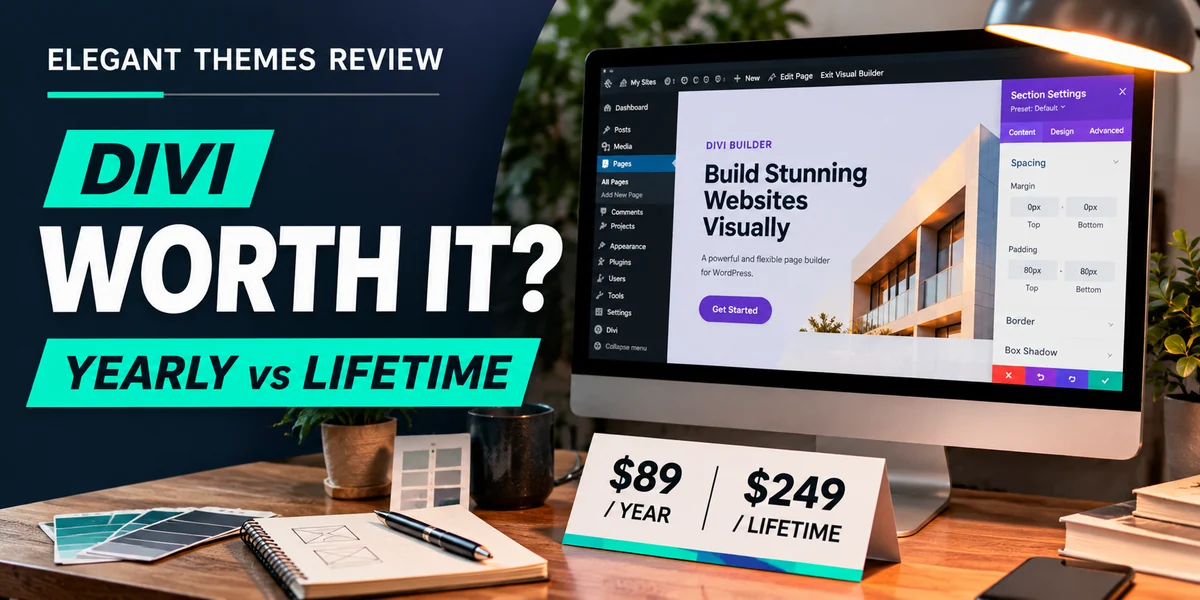
- Price: about $89 a year or about $249 once. The lifetime plan pays for itself in just under three years.
- Best for: freelancers, agencies and anyone who wants full visual design control in one package.
- Look elsewhere if you want the lightest possible site or a free tool. Astra and GeneratePress are leaner, and Elementor Pro lets you keep your own theme.
What Is Elegant Themes?
Elegant Themes is a WordPress product company. Its flagship product is Divi, a theme that includes a visual drag-and-drop page builder, so you can design pages on screen instead of coding them. You don’t buy Divi on its own. You buy an Elegant Themes membership that gives you access to it.
As listed in 2026, a standard membership includes:
| What’s included | What it does |
|---|---|
| Divi theme and builder | Visual design of pages, headers, footers and templates |
| Extra theme | A magazine-style theme from the same company |
| Bloom and Monarch | Email opt-in forms and social sharing tools |
| Divi Quick Sites and website packs | Ready-made starter sites you can adapt |
| Divi Dash | Manage multiple sites from one dashboard |
| Support | 24/7 support, with VIP tiers on higher plans |
The catch: there’s no free version. You pay first and have a 30-day money-back guarantee to decide. You can see the full details on the Elegant Themes site, or go straight to the current plans.
Elegant Themes Pricing: Yearly vs Lifetime
Elegant Themes sells two main ways to pay, and a higher tier with extra services. These are the 2026 listed prices.
| Plan | Price (as listed) | Best for |
|---|---|---|
| Divi Yearly | About $89 a year | One or two projects, or a trial year |
| Divi Lifetime | About $249 once | Anyone planning to use it for years or on many sites |
| Divi Pro | About $277 a year | Adds Divi AI, Cloud, VIP support and Teams |
| Divi Lifetime + Pro services | About $297 | Lifetime Divi plus Pro services (these are reported to renew yearly) |
All plans cover unlimited websites. Prices come from 2026 listings and third-party trackers, which don’t always match, so confirm on the pricing page. Elegant Themes has run Black Friday and Cyber Monday sales before, so check for a discount if you’re reading this in November.
When does lifetime beat yearly?
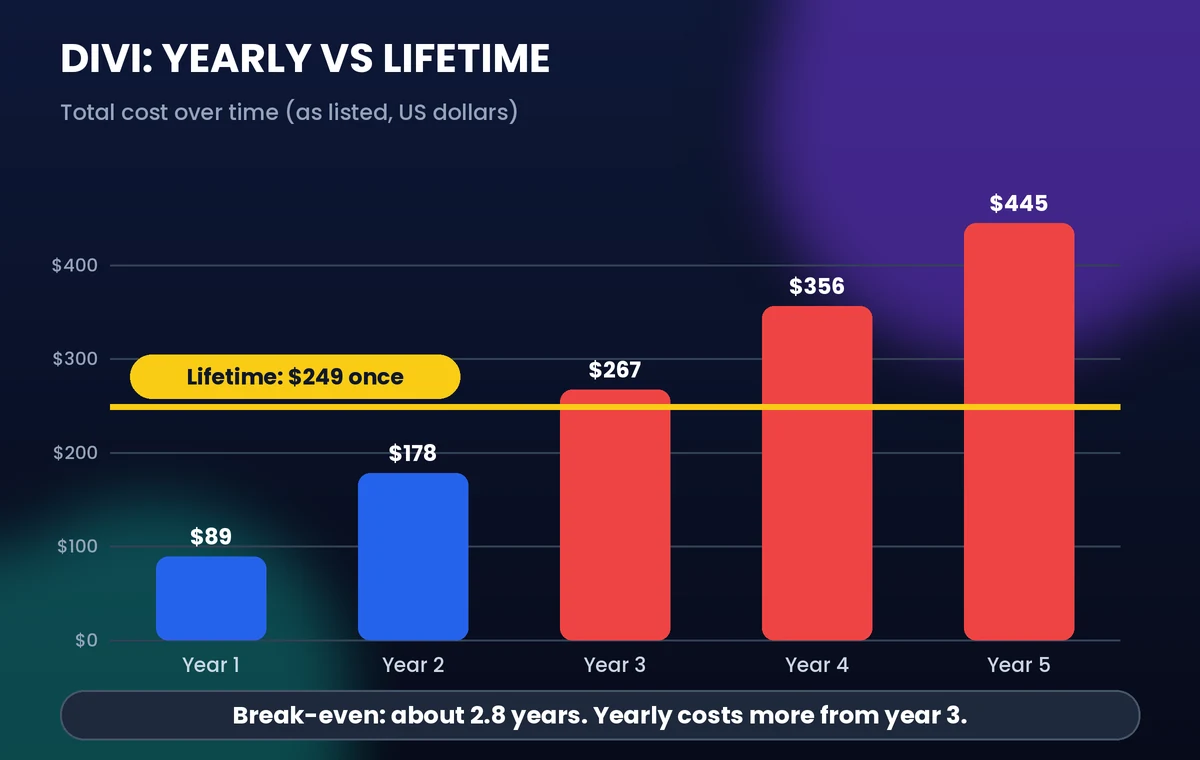
The math is simple: $249 ÷ $89 is about 2.8 years. If you’ll still use Divi in year three, lifetime wins. Use the calculator with your own numbers.
Yearly vs Lifetime Calculator
Planning more than a couple of years?
Check the current Divi plans and any sale pricing before you pay.
Check Divi pricing →What Changed With Divi 5
Elegant Themes released Divi 5 on February 26, 2026. It's a ground-up rebuild of the builder, and existing Divi 4 users can update at no extra cost. According to Elegant Themes, Divi 5 pages load two to four times faster than Divi 4 pages and ship far less JavaScript and CSS. Those are the vendor's own figures, so run your own tests.
Reviewers highlight these changes:
- Better performance. Pages load only the code they need.
- A move away from shortcodes. Older Divi sites could leave messy code behind if you switched themes. Divi 5 is said to improve that.
- Customizable breakpoints for more responsive design control.
- A new developer API, which should lead to better third-party add-ons.
Before you upgrade an existing site: back it up first, use the migration tool and rollback option, and check that your third-party Divi add-ons are Divi 5 compatible. Some may need updates.
Elegant Themes Pros and Cons
Pros
- Unlimited websites on every plan.
- Visual design control without coding.
- A lifetime option that can be cheap over time.
- Extras and starter packs included.
- Strong user ratings, such as about 4.8 out of 5 from around 250 reviews on G2.
- A 30-day money-back guarantee.
Cons
- No free version.
- It can feel overwhelming to beginners.
- Heavier than lean themes if you don't optimize.
- Reviewers say the third-party Divi Marketplace can get expensive.
- Some users complain about large updates and a slow visual editor.
- Third-party add-ons may need updates for Divi 5.
Is Elegant Themes Worth It?
For the right buyer, yes. If you build several sites, want visual control and plan to keep using Divi for three years or more, an Elegant Themes membership is good value, and the 30-day guarantee lowers the risk. If you only need a fast, simple site, you can get most of the way there for free with a lightweight theme and the block editor. That's the honest answer from this Elegant Themes review: it's worth it when you'll use what it offers.
Who Should Use Elegant Themes (and Who Shouldn't)
| You are... | Our take |
|---|---|
| A freelancer or agency building many sites | Good fit. Unlimited sites and a lifetime option are the big draw. |
| A beginner who wants to design visually | Good fit, with a learning curve. Start with Quick Sites and a starter pack. |
| A small business owner building one site | Fine. The yearly plan keeps the cost low. |
| A blogger who just wants to write fast | Probably skip. A lightweight theme such as GeneratePress or Astra is leaner. |
| Someone who wants the fastest possible site | Be careful. Test speed first, or choose a lean theme. |
| Someone who doesn't want to be tied to one builder | Consider alternatives, such as the block editor with a lightweight theme. |
Elegant Themes vs Elementor Pro, Astra and GeneratePress
These four often get compared, but they aren't the same kind of product.
| Elegant Themes (Divi) | Elementor Pro | Astra | GeneratePress | |
|---|---|---|---|---|
| What it is | Theme plus builder, one membership | Page builder plugin | Lightweight theme | Lightweight theme |
| Works with your own theme? | No, it is the theme | Yes | It is the theme | It is the theme |
| Design freedom | Very high | Very high | High, with a builder or blocks | High, with blocks or a builder |
| Speed focus | Improving with Divi 5 | Depends on setup | Lean by design | Lean by design |
| Best for | All-in-one visual design | Keeping theme choice | Flexible starter sites | Speed and simplicity |
In plain terms:
- Divi is the one-package route: everything under one membership.
- Elementor Pro is a builder you can add to almost any theme, which suits people who want to choose their own theme.
- Astra is a lightweight theme with a large library of starter sites.
- GeneratePress is a lean, fast theme known for simplicity, a good base for speed-focused sites.
Still choosing a platform at all? See our guides to the easiest site builder and Joomla vs WordPress. Selling products instead? Our best Shopify themes for dropshipping review covers that side.
How to Keep a Divi Site Fast
Any visual builder can produce a heavy page, and Divi is no exception. These habits matter more than which theme you pick.
- Start with good hosting. Slow servers will drag down any theme. See our Bluehost vs DreamHost comparison.
- Use caching. Hosts on LiteSpeed servers pair well with the free LiteSpeed Cache plugin.
- Keep pages simple. Fewer modules, sections and animations mean lighter pages.
- Compress images and use modern formats like WebP.
- Add an SEO plugin such as Rank Math SEO for titles, meta descriptions and schema.
- Test regularly with Google PageSpeed Insights, on mobile first.
The 7-Day Test Plan (Use the 30-Day Refund)
Because there's no free version, treat the first week as your trial. Decide well inside the refund window.
- Day 1: install Divi, connect your license, and import a starter pack.
- Day 2: build your homepage using the visual builder.
- Day 3: check how it looks and behaves on mobile.
- Day 4: run PageSpeed Insights and note the mobile results.
- Day 5: add the plugins you need, such as forms or WooCommerce.
- Day 6: ask support a real question and see how quickly they answer.
- Day 7: decide. Keep it, or request a refund.
Want to test Divi yourself?
You have a 30-day money-back guarantee, so you can build a real page before you commit.
Try Divi risk-free → See Astra →Frequently Asked Questions
What is Elegant Themes?
Elegant Themes is the company behind Divi, a popular WordPress theme and visual page builder. A membership also includes its other products, such as the Extra theme and the Bloom and Monarch plugins, plus layouts, a site-management dashboard and support.
Is Elegant Themes the same as Divi?
Not exactly. Elegant Themes is the company, and Divi is its flagship product. When people say they bought Elegant Themes, they usually mean a membership that gives them Divi and the extras.
How much does Elegant Themes cost?
As listed in 2026, Divi is about $89 a year or about $249 as a one-time lifetime payment, both for unlimited websites. Higher Pro plans add services such as Divi AI, Cloud storage, VIP support and Teams. Prices change, and Elegant Themes often runs sales around Black Friday, so check its pricing page.
Is there a free version of Divi?
No. Divi requires a paid Elegant Themes membership. There is a 30-day money-back guarantee, so you can test it and request a refund if it isn't right.
Is the Divi lifetime plan worth it?
Usually, if you'll use Divi for about three years or more, or on several sites. At $89 a year versus $249 once, the lifetime plan breaks even in just under three years. Pro services such as Divi AI are separate and are reported to renew yearly.
Is Divi good for SEO?
Divi doesn't make a site rank by itself. Google cares about helpful content, speed, mobile usability and links. Divi 5 is said to produce lighter pages than Divi 4, but you should still test your own site and pair it with an SEO plugin and a good host.
Is Divi slow?
Older Divi versions had a reputation for heavier pages. Elegant Themes says Divi 5 is two to four times faster than Divi 4, but that's the vendor's claim. Speed also depends on your hosting, images, plugins and caching, so test your own site.
Divi vs Elementor: which is better?
Divi is a theme plus builder with unlimited sites for one membership. Elementor Pro is a builder plugin that works with almost any theme. Divi suits people who want one system. Elementor suits people who want to keep their theme choice. Try both's refund windows if you're unsure.
Divi vs Astra or GeneratePress: which should I choose?
Astra and GeneratePress are lightweight themes designed to stay fast and pair with a builder or the block editor. Divi is an all-in-one visual design system. Choose Divi for design freedom in one package, or Astra or GeneratePress for a lean base.
Can I upgrade from Divi 4 to Divi 5?
Yes. Existing Divi users can update to Divi 5 at no extra cost. Back up first and check that your third-party add-ons are compatible, because some may need updates.
Final Thoughts
Elegant Themes is a strong choice if you want one package for visual design, especially for freelancers and agencies who value unlimited sites and a lifetime option. It's less compelling if your priority is the leanest possible site, or if you want to keep your theme and builder separate.
So decide by your priority. For all-in-one design freedom, try Divi. For a fast base, look at GeneratePress or Astra. For a builder on top of your own theme, Elementor Pro. Whichever you pick, use the 7-day test, check speed on your own content, and don't pay for more than you need.
Ready to choose?
Compare the options and use the refund window to test your pick.
See Elegant Themes → See GeneratePress →