If you’re stuck on Joomla vs WordPress, you’ve probably noticed that most comparisons end the same way: “WordPress is easier, Joomla is more flexible.” That’s true, but it doesn’t tell you which one to install on your domain tonight.
So this guide gets specific. We’ll compare both on ease of use, plugins, SEO, security, cost and growth, look at where Drupal fits, and finish with a quick way to decide. For most people the answer is clear. We’ll also say when it isn’t.
The Short Answer
- Pick WordPress if you’re a beginner, blogger, small business owner or affiliate publisher. You get the biggest choice of themes, plugins, tutorials and developers.
- Pick Joomla if you need built-in multilingual support, detailed user permissions or complex content structures, and you don’t mind a steeper learning curve.
- Pick Drupal if you’re building a large, highly custom site with a technical team.
- The numbers: at the time of writing, WordPress runs about 59% of sites that use a known CMS. Joomla is under 2%, according to W3Techs.
What Are WordPress and Joomla?
Both are free, open-source content management systems (CMS). A CMS lets you create and manage a website without coding every page by hand. Both run on PHP and a database, and most hosting companies install either one with a single click.
WordPress began as a blogging tool and grew into a general-purpose CMS. People often mix up two versions: WordPress.org is the free software you install on your own hosting, and WordPress.com is a hosted service. When people compare WordPress vs Joomla, they almost always mean the self-hosted WordPress.org version. You can read the project’s own overview at wordpress.org.
Joomla launched in 2005 as a full CMS from the start, with built-in features for content, users and languages. Its official home is joomla.org.
I’ve built and managed several websites with WordPress, including DigitalEarnHub.com, where I focus on digital marketing, SEO, blogging, and online business tools. I like WordPress because it gives me the flexibility to customize a website, publish content, and improve its SEO without needing to code everything from scratch. My experience with Joomla is more limited, so I would want to explore its workflow and extension system further before making a direct comparison.
Joomla vs WordPress at a Glance
| Category | WordPress | Joomla | Edge |
|---|---|---|---|
| Ease of use | Simple dashboard, friendly block editor | More menus and settings, steeper curve | WordPress |
| Themes and add-ons | Huge ecosystem | Smaller library of templates and extensions | WordPress |
| Multilingual sites | Needs a plugin | Built in | Joomla |
| User roles and permissions | Basic roles, plugins for more | Detailed access control built in | Joomla |
| Blogging | Designed for it | Works, but not the focus | WordPress |
| SEO | Strong with an SEO plugin | Solid built-in basics | Slight WordPress |
| Help and community | Very large | Smaller but active | WordPress |
| Software cost | Free | Free | Tie |
| Finding a developer | Easy and plentiful | Fewer to choose from | WordPress |
Ease of Use: Which Is Easier for Beginners?
Installing
This is close to a tie. Most good hosts offer one-click installers for both. You can have either running in a few minutes.
The dashboard
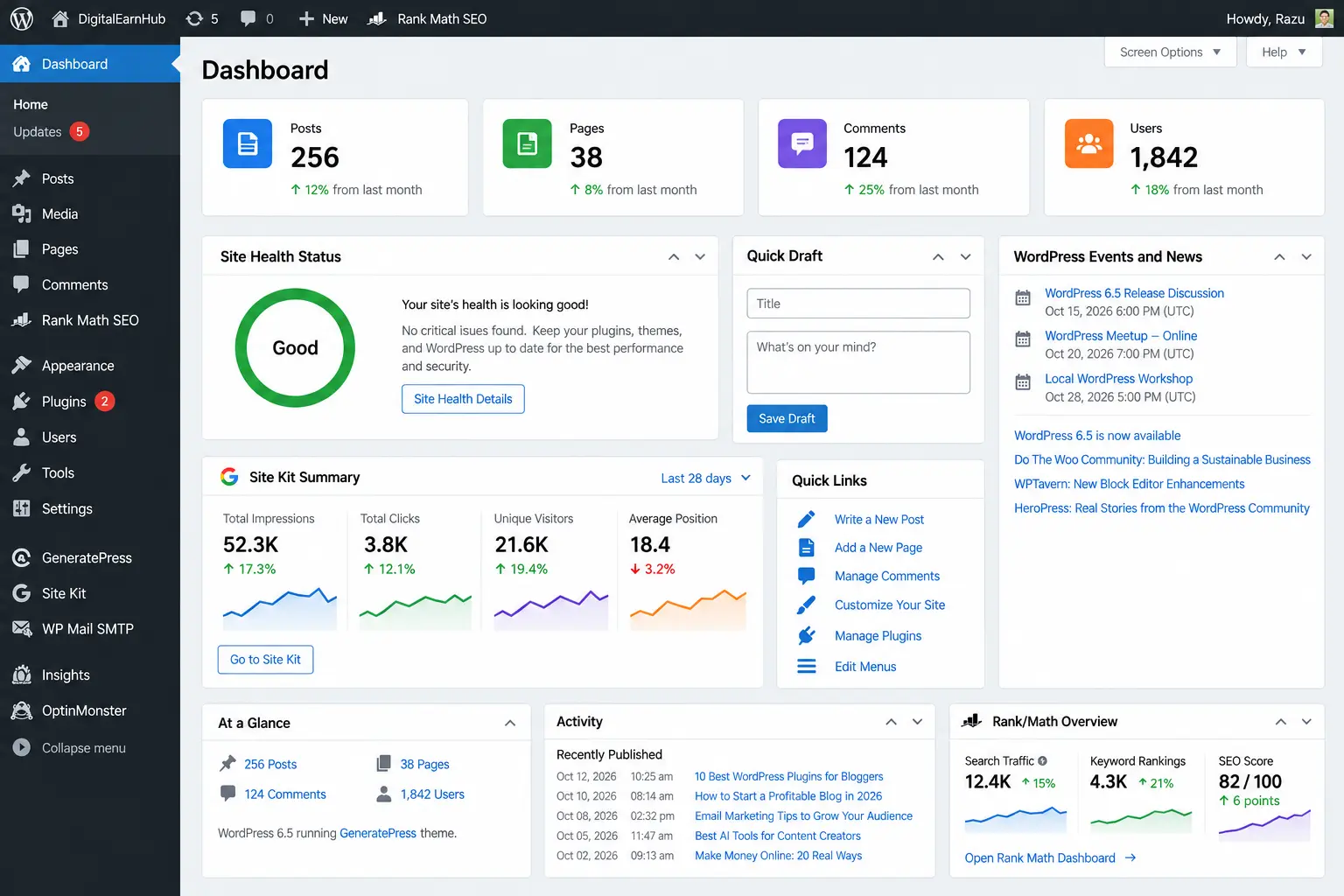
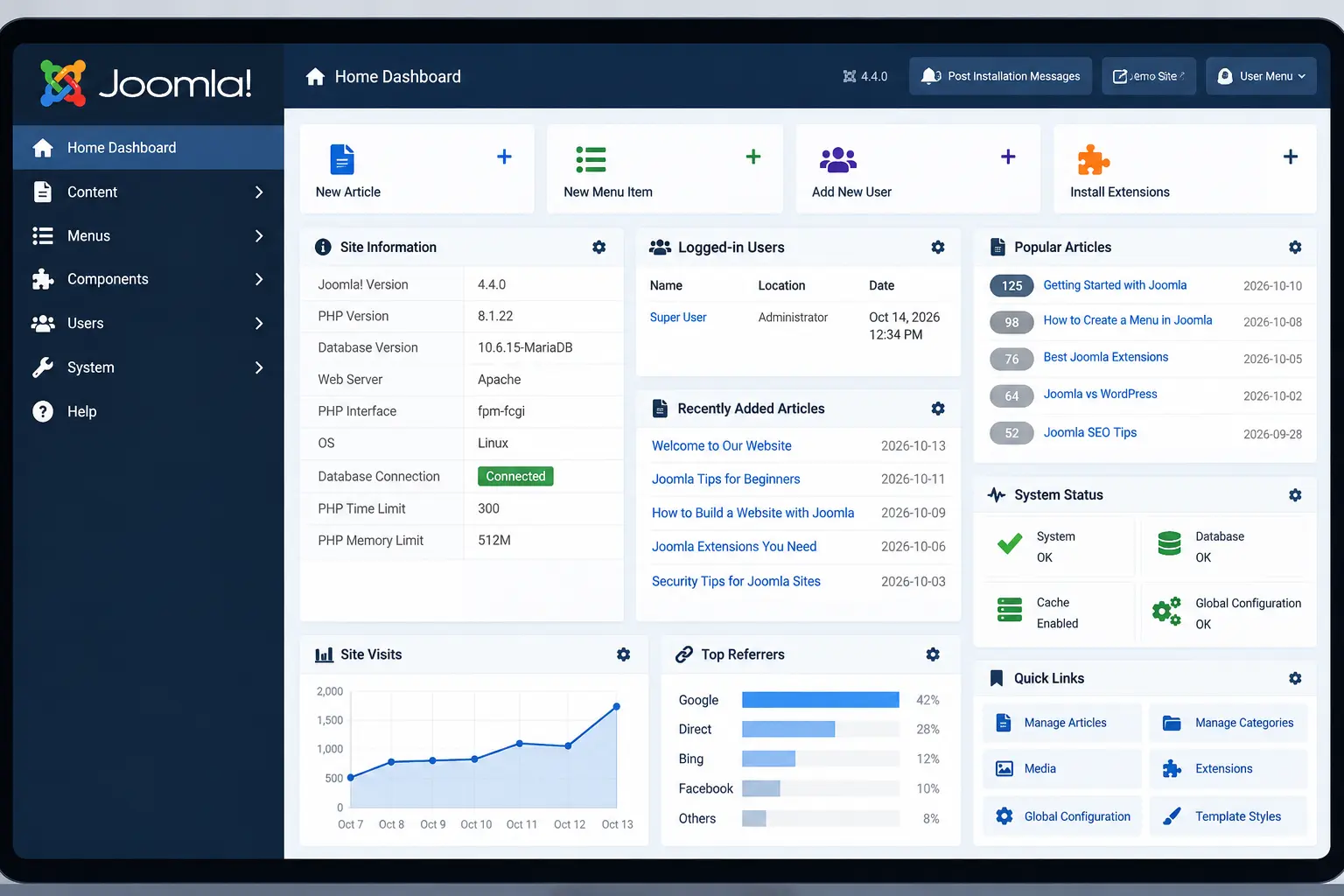
This is where the gap opens up. The WordPress dashboard is cleaner, with a short menu on the left and obvious places to add posts, pages and plugins. Joomla’s admin area has more layers, and finding a setting can take a few extra clicks. Neither is hard once you know it, but a first-time user will feel the difference on day one.
Writing and editing content
WordPress uses a block editor where you build pages from pieces such as paragraphs, images, buttons and columns. Joomla uses a more traditional article editor, with extra tools if you want drag-and-drop layouts. If you publish often, WordPress is smoother. And if you want more control over layouts, a visual page builder such as Elementor Pro lets you design pages by dragging and dropping.
Winner: WordPressThemes, Plugins and Extensions
WordPress calls them themes and plugins. Joomla calls them templates and extensions. The idea is the same: add design and features without writing code.
WordPress has tens of thousands of free plugins and a large market of premium themes. Joomla has a few thousand extensions. If you want a booking form, a membership area, a store or an SEO tool, you’ll find more choices and more reviews for WordPress, and a fix is easier to find when something breaks.
One caution applies to both. A big library doesn’t mean every add-on is good. Before installing anything, check when it was last updated, how many people use it, and what the reviews say. On the theme side, lightweight options such as GeneratePress, Astra and Divi from Elegant Themes cover most types of site. If you’re building a WordPress site for affiliate content, our list of the best free WordPress themes for affiliate marketing is a good place to start.
Winner: WordPressWordPress vs Joomla for SEO
Here’s the honest part: Google doesn’t rank sites higher because of their CMS. What matters is useful content, clear page titles, fast loading, good mobile design and links from other sites. Google’s own SEO starter guide says nothing about needing a particular platform.
That said, the two do differ in practice. Joomla includes the basics, such as clean URLs and fields for meta descriptions. WordPress gets you most of the way there too, and adds a wide choice of SEO plugins, such as Rank Math SEO, that guide you step by step. If you aren’t an SEO specialist, that extra guidance helps.
Winner: Slightly WordPressSecurity
Neither platform is automatically safer. Most hacked sites have one thing in common: outdated software or an abandoned plugin or extension. WordPress is a bigger target because it’s so widely used, while Joomla has fewer security add-ons to choose from. Both release security updates regularly.
Whichever you choose, do these five things:
- Update the core software, themes and add-ons promptly.
- Install only add-ons that are actively maintained.
- Turn on two-factor login for admin accounts.
- Back up the site on a schedule, and test that you can restore it.
- Use a reputable host.
Speed and Hosting
Speed depends far more on your hosting, your theme, your images and your caching than on the CMS itself. A lean WordPress site on good hosting will beat a bloated Joomla site, and the reverse is also true. Joomla includes built-in caching options. With WordPress, caching usually comes from a plugin or from the host. Hosts running LiteSpeed servers pair well with the free LiteSpeed Cache plugin.
Good hosts that support both include Hostinger, Bluehost, and managed cloud host Cloudways. Compare the plans yourself, check renewal prices, and pick one with caching and daily backups.
Winner: Depends on your setupCost
The software is free for both. The real costs are the same ones either way: a domain name, hosting, a premium theme or template if you want one, paid add-ons, and developer time if you hire help. Since WordPress developers are easier to find, hiring one is often simpler and can be cheaper. That depends on your region and the job, so get a couple of quotes.
Winner: Tie on software, WordPress on hiringWhere Joomla Genuinely Wins
It would be unfair to stop here, because Joomla does some things better out of the box.
- Multilingual sites. Joomla lets you run a site in several languages without installing an extra plugin.
- User permissions. Its access control lets you decide exactly who can see, edit or publish what. That’s useful for large teams, schools, associations and membership sites.
- Complex content. Custom fields and flexible content categories are built in, which suits directories and structured content.
- Fewer add-ons to start. You can often get further before you need a third-party extension.
If those four points match your project, Joomla deserves serious consideration, even though WordPress wins on popularity.
Joomla vs WordPress vs Drupal
People searching for Drupal vs WordPress or Drupal Joomla comparisons are usually after the same thing: which CMS fits a bigger or more serious project. Here’s the quick version.
| WordPress | Joomla | Drupal | |
|---|---|---|---|
| Best for | Blogs, small business, content and affiliate sites, stores | Multilingual and structured sites with many user roles | Large, complex, highly custom builds |
| Learning curve | Gentle | Moderate to steep | Steepest |
| Flexibility | High, via plugins | High, built in | Very high, via development |
| Community size | Very large | Smaller | Smaller, technical |
| Usually needs a developer? | Not for simple sites | Sometimes | Almost always |
Drupal powers a small slice of the web, roughly 1% of CMS-powered sites, but it shows up on large and complex projects. If you aren’t sure you need it, you almost certainly don’t. You can learn more at drupal.org.
Joomla or WordPress: Which Should You Choose?
Read each line and stop at the first one that sounds like you.
- I’m new to websites. → WordPress.
- I want to blog or run an affiliate or content site. → WordPress.
- I want the most themes, plugins and tutorials. → WordPress.
- I plan to sell products. → WordPress with WooCommerce, or a dedicated store platform. Read our guide to the easiest site builder if you’d rather not manage a CMS at all.
- I need a site in several languages, with many editors and permission levels. → Joomla is worth a close look.
- I have a developer who already prefers Joomla. → Joomla.
- I’m building a large, custom platform with a technical team. → Consider Drupal.
If none of those lines clearly fits, choose WordPress. It’s the lower-risk option, because help, tools and people are easy to find.
How to Compare Content Management Systems Before You Commit
Whether you’re picking between these two or looking at the best content management systems more broadly, run through six questions first.
- What’s my skill level? Be honest. A tool you can’t operate will cost you more than a simpler one.
- What kind of content will I publish? Posts, products, courses, directories and members-only pages all need different things.
- Who will maintain it? Updates and backups don’t do themselves.
- What’s my real budget? Count hosting, extras and help, not just the free software.
- How much will I grow? Think about where the site might be in two years.
- Could I leave? Check that you can export your content later.
Open-source CMS tools aren’t your only route. If you want the least setup and maintenance, a hosted builder may suit you better.
Switching Later: Joomla to WordPress or Back
You can move, but it takes planning. Your posts and pages can usually be transferred with migration tools. Your design usually can’t, so expect to rebuild that. Before switching, make a full backup, list your current URLs, and set up 301 redirects from old addresses to new ones so you keep your search traffic. Test everything on a staging copy first.
Once your site is live, you’ll need visitors. Our guide to a Pinterest traffic strategy shows one way to get them without an ad budget.
Frequently Asked Questions
Joomla vs WordPress: which one is better?
For most people, WordPress is better because it’s easier to learn and has far more themes, plugins, tutorials and developers. Joomla is the better fit when you need built-in multilingual support, detailed user permissions or complex content structures and you’re comfortable with a steeper learning curve.
Is Joomla easier than WordPress?
Usually no. Both install in a few clicks on most hosts, but WordPress has a simpler dashboard and a friendlier editor. Joomla’s menus and options take longer to understand, especially for first-time site owners.
Is Joomla dead?
No. Joomla is still actively developed and gets regular releases. But its share of the market has been shrinking for years and is now under 2% of CMS-powered sites, so there are fewer extensions, tutorials and developers than for WordPress.
Which is better for SEO, WordPress or Joomla?
Both can rank well. Google doesn’t favor either platform. WordPress has a slight edge because SEO plugins are easy to add and well supported, while Joomla includes solid basics such as clean URLs and meta fields out of the box. Content quality, site speed and links matter far more than the CMS.
Is Joomla or WordPress more secure?
Neither is automatically safer. Most hacked sites run outdated software or abandoned plugins and extensions. Keep everything updated, use trusted add-ons, enable two-factor login, take backups and choose good hosting, and either platform can be run securely.
Joomla versus WordPress for ecommerce: which is better?
WordPress has WooCommerce, which is widely used and well supported. Joomla has ecommerce extensions too, but fewer options. If selling is your main goal, also consider a dedicated store platform such as Shopify.
Is Joomla free?
The Joomla software is free and open source, just like WordPress. You’ll still pay for a domain, hosting, and any premium templates, extensions or developer time.
Where does Drupal fit when you compare these CMSs?
Drupal is the most developer-oriented of the three. It suits large, highly custom sites built by technical teams. WordPress suits most beginners and small businesses, and Joomla sits in the middle with more built-in structure than WordPress but a smaller community.
Can I switch from Joomla to WordPress later?
Yes, but plan for work. Content such as posts and pages can usually be moved with migration tools, but you’ll need to rebuild the design, check your URLs, and set up 301 redirects so you don’t lose search traffic.
Final Thoughts
The Joomla vs WordPress question has a straightforward answer for most people: WordPress. It’s easier to learn, has far more add-ons and help, and is simpler to hire for. Joomla is a good, capable CMS that still earns its place for multilingual sites, detailed permissions and structured content.
Start from what you’re building, not from which platform sounds more powerful. Match your project to the scenarios above, and if you’re still unsure, set up a free test site on each and spend an hour in both dashboards. That hour will tell you more than any comparison, including this one.