Most website owners treat Pinterest like a social network: post, hope, repeat. That approach rarely works. Pinterest behaves much more like a visual search engine, and people use it to find ideas, compare options, and plan what to do next. If your content answers those searches, a solid Pinterest traffic strategy can send steady, relevant visitors to your site without a big ad budget.
This guide walks through a repeatable system, from keyword research to analytics, plus a 30-day plan you can start this week.
Key Takeaways
- Pinterest works best as a search and discovery channel, not a follower-count game.
- Start with keyword research, then build the article, then design the Pin.
- One article can support several Pins, each with a different angle.
- Track outbound clicks, not just impressions.
- Double down on topics that prove themselves and build content clusters around them.
Why Pinterest Can Drive Long-Term Traffic
On most social platforms, a post gets a short burst of attention and then disappears down the feed. Pinterest content tends to last longer, because people search it and save it for later. A Pin you publish today can still earn clicks weeks or months from now.
That changes the question you should be asking. Instead of “What should I post today?”, ask “What is my audience searching for, and do I have the best answer?” You are building a library of searchable assets that point back to your site.
The Pinterest Traffic Loop
Sustainable growth comes from a loop, not a single viral Pin:
Each pass through the loop gives you data. Over time you learn which topics, headlines, and designs your audience responds to, and you can make more of what works.
Step 1: Start With Keyword Research
Many beginners design Pins first and think about keywords later. Flip that order. Ask yourself:
- What does my audience search for?
- What problems are they trying to solve?
- Which topics are seasonal?
- Where can I offer something genuinely better than what already exists?
Pinterest Trends shows search interest over time, seasonal patterns, and related queries. Use it alongside Pinterest’s search suggestions to find specific phrases.
If your site covers online business, don’t stop at “online business.” Break it into narrower topics such as:
- work-from-home business ideas
- affiliate marketing for beginners
- how to start a blog
- digital products to sell online
- Pinterest marketing for bloggers
You are not stuffing keywords into one post. You are mapping out content opportunities.
Step 2: Match Topics to Search Intent
A keyword only helps when you understand why someone is typing it. Compare “Pinterest” with “how to get website traffic from Pinterest.” The first is vague. The second tells you exactly what the searcher needs.
| Intent type | Example search | Content that fits |
|---|---|---|
| Informational | How does Pinterest SEO work? | Explainer or guide |
| Problem-solving | Why are my Pins not getting clicks? | Troubleshooting post |
| Commercial research | Best Pinterest scheduling tools | Comparison or review |
| Action-oriented | How to design Pins that get clicks | Step-by-step tutorial |
Give each intent its own article instead of cramming everything into one giant post.
Step 3: Fix the Article Before You Make More Pins
Pinterest can send the visitor, but it can’t rescue a weak page. If someone clicks a Pin promising seven tips and lands on a slow, vague, filler-heavy article, that click is wasted. Make sure your page:
- delivers exactly what the Pin promised, near the top
- uses clear headings and short paragraphs
- includes examples, screenshots, or tables where they help
- loads fast and reads well on mobile
- links to related articles on your site
Google’s guidance on helpful, people-first content favors pages written for readers over pages written mainly to chase search traffic. Your Pinterest and Google strategies point the same way: be genuinely useful.
Step 4: Turn One Article Into Several Pins
This is where Pinterest scales. Say you publish How to Start Affiliate Marketing With WordPress. You can promote it with several angles:
- How to Start Affiliate Marketing With WordPress
- 7 Steps to Build Your First Affiliate Website
- Beginner’s Guide to WordPress Affiliate Marketing
- Build an Affiliate Site on a Small Budget
- Affiliate Website Mistakes Beginners Should Avoid
Every Pin can link to the same article as long as the angle honestly matches the page. You get more chances to test headlines without writing five separate posts.
This also helps internal linking. A reader moving from this guide to our list of the best free WordPress themes for affiliate marketing follows a natural path: Pinterest → traffic guide → website setup → affiliate content.
Step 5: Design Pins That Make Sense in One Second
Your Pin competes with hundreds of others, and nobody studies it before deciding. The headline has to show the value instantly.
- Weak: Pinterest Tips
- Stronger: 9 Pinterest SEO Mistakes Costing You Traffic
You don’t need clickbait. You just need the benefit to be obvious. A good Pin quickly answers at least one question: What will I learn? What problem does this solve? Why should I click?
Use a vertical format (2:3 ratio, such as 1000 × 1500 px), readable text, high contrast, and consistent branding so your Pins are recognizable in the feed.
Step 6: Use Pinterest SEO Naturally
Pinterest SEO means giving the platform enough context to understand your content. It does not mean repeating a keyword twenty times. Place relevant terms naturally in:
- the Pin title and description
- text overlay on the Pin image
- board names and descriptions
- the destination article itself
If your target phrase is “Pinterest traffic strategy,” a Pin might read Pinterest Traffic Strategy: 7 Steps to Grow Your Website, with a description that naturally mentions keyword research, Pin design, and analytics. Then the article has to actually cover those things. That consistency between Pin, description, and landing page is what relevance means here.
Step 7: Build Boards That Reflect Your Site
Your boards should mirror your website’s topics. For a digital marketing site, that might look like:
- Affiliate Marketing: tutorials, tools, strategies
- Blogging Tips: content creation, SEO, growth
- Pinterest Marketing: Pin design, SEO, traffic
- Online Business Ideas: models for beginners
- WordPress Tips: themes, plugins, optimization
A visitor to your profile should understand what you are about within a few seconds.
Step 8: Measure Outbound Clicks, Not Just Impressions
Pinterest Analytics offers several metrics, and they mean different things:
- Impressions: how often your Pin appeared
- Saves: how often people saved it
- Pin clicks: how often people opened it
- Outbound clicks: how often people clicked through to your website
If your goal is traffic, outbound clicks matter most. A million impressions means little if nobody visits your site. Track the full path:
For an affiliate site, extend it: visit → article engagement → affiliate click → sale. Now Pinterest is part of your funnel instead of an isolated social account.
Example: Reading a Pinterest Analytics Report
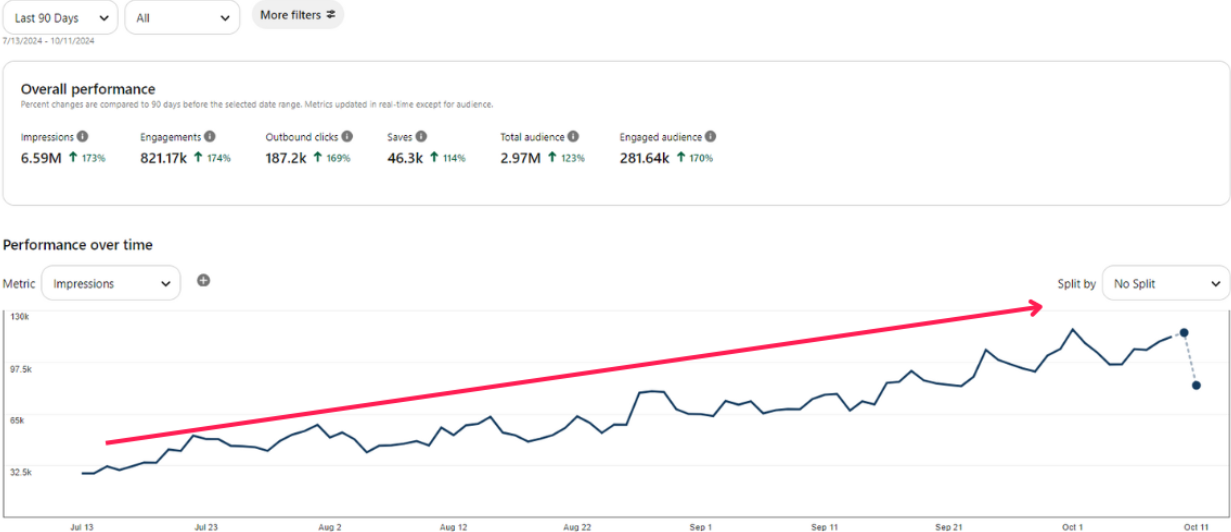
The size of the numbers matters less than the relationships between them. Is the account only collecting impressions, or turning attention into engagement and outbound traffic? When you review your own report, ask:
- Which Pins earn the most impressions?
- Which earn saves?
- Which drive outbound clicks?
- Which topics bring the right visitors to my site?
Sort your top Pins and boards by each metric to see the patterns.
Step 9: Build a Content-to-Pin Workflow
Fold Pinterest into your publishing routine instead of treating it as an extra chore. For each new article:
- Research the main keyword and related searches.
- Optimize the article so it truly answers the query.
- Create 3-5 Pin concepts with different headlines and layouts.
- Link each Pin to the most relevant page, never just the homepage.
- Publish consistently on a schedule you can sustain.
- Review the data for Pins that earn real clicks.
- Make more around the winners.
Step 10: Use Your Winners as Research
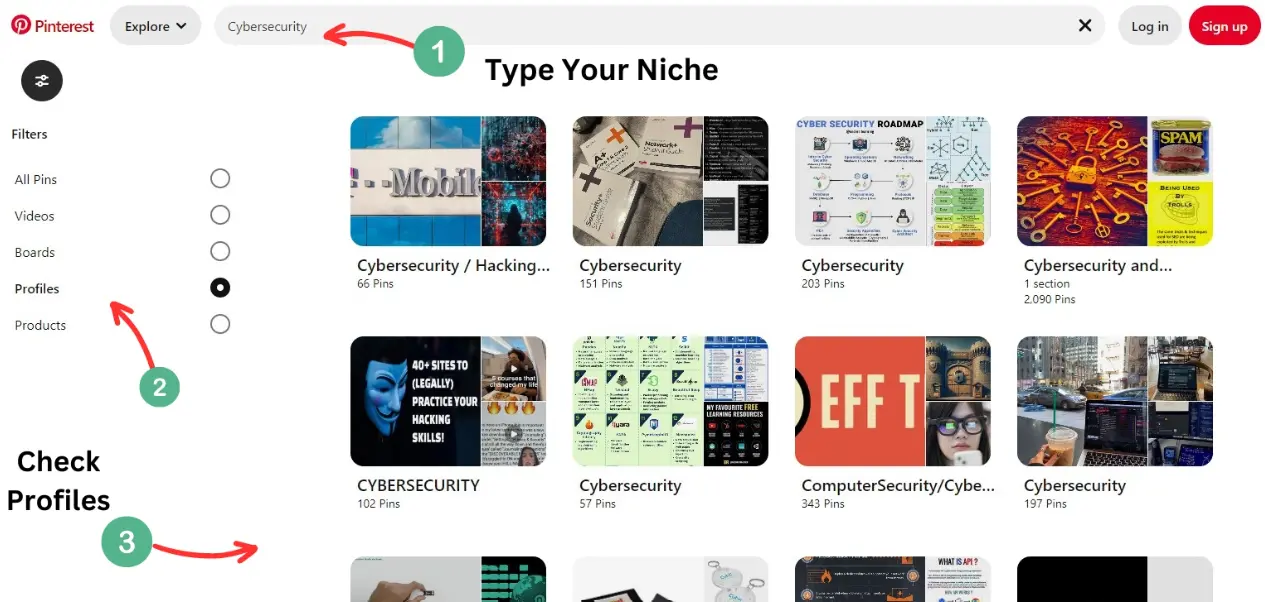
Analytics are also a content roadmap. If your posts about AI tools for bloggers consistently outperform your generic blogging posts, that is a signal. Expand it into a cluster:
- Best AI Tools for Bloggers
- How to Use AI for Blog Research
- AI Writing Tools for Content Creators
- AI SEO Tools for Small Websites
One successful topic becomes a content cluster, which strengthens topical relevance and gives you more chances to capture related searches on both Pinterest and Google.
Step 11: Don’t Neglect Your Website
Plenty of people polish their Pinterest profile while their site is slow and hard to navigate. Your website is where traffic becomes valuable, so check that:
- pages load quickly
- the site works well on mobile
- articles are easy to scan
- navigation and internal links are clear
- images are compressed
- CTAs and email signup are easy to find
Step 12: Link to Credible Sources
Linking out to authoritative resources makes your article more trustworthy. Good sources for this topic include Pinterest Analytics documentation, Pinterest Trends, and Google Search Central’s helpful content guidance.
How Long Does It Take to Reach 100K Pageviews?
There is no honest universal answer. Results depend on your niche, search demand, content quality, existing authority, publishing consistency, and how well you learn from data.
Instead of chasing “100K in 30 days,” think in stages: 1,000 monthly visitors, then 5,000, then 10,000, then 25,000. Smaller milestones are easier to plan around and much less discouraging.
A Simple 30-Day Pinterest Traffic Plan
- Week 1, Research: Find 20-30 topics, group them into clusters, and note the intent behind each.
- Week 2, Content: Publish or improve a few strong articles and add internal links between related posts.
- Week 3, Pin creation: Design multiple Pin concepts for your best articles and test different headlines and layouts.
- Week 4, Publish and analyze: Post consistently, track impressions, saves, Pin clicks, and outbound clicks, then identify your early winners.
Resist checking stats every few hours. Look for patterns across weeks.
Common Pinterest Traffic Mistakes to Avoid
- Pretty Pins with no strategy. Design alone doesn’t create traffic.
- Only targeting broad keywords. Specific intent usually wins.
- Sending every Pin to the homepage. Link to the page that fulfills the promise.
- Ignoring outbound clicks. For traffic goals, they are the key number.
- Publishing thin articles. A great Pin can’t save a poor page.
- Keyword stuffing. Write for people first.
- Quitting too early. Pinterest content can keep performing long after publication.
- Obsessing over followers. Traffic and business results matter more.
Frequently Asked Questions
Is Pinterest still good for website traffic?
Yes, especially for content that matches search, planning, and visual discovery behavior. Pinterest Analytics lets you measure outbound clicks directly.
How do I get traffic from Pinterest to my website?
Create useful content around topics your audience searches for, make accurate and relevant Pins, optimize titles and descriptions, link to the right page, and use analytics to see what earns outbound clicks.
What’s the best Pinterest traffic strategy for beginners?
Focus on a few topics rather than everything. Write helpful articles, create several Pin concepts for each, optimize your keywords, and review results regularly.
How many Pins should I create per blog post?
There is no magic number. Create several genuinely different angles for your most important articles and test which ones your audience prefers.
Does Pinterest SEO really matter?
Yes. Relevant keywords, clear titles and descriptions, board context, and a matching landing page help Pinterest understand what your Pin is about.
Can a new website get traffic from Pinterest?
Yes, though no amount is guaranteed. Results depend on your niche, content quality, consistency, and audience response.
Should I focus on impressions or clicks?
If your goal is traffic, outbound clicks align most directly with it.
Can Pinterest help an affiliate website?
Yes, when Pins accurately represent helpful destination pages such as tutorials, comparisons, and guides. Follow Pinterest’s rules and disclose affiliate relationships.
Final Thoughts
Pinterest is not a slot machine. Publishing a Pin and hoping for luck isn’t a strategy. A real Pinterest traffic strategy starts with understanding what people want, creating content that earns the click, packaging it into clear Pins, and learning from the data.
One article can become several Pins. One winning topic can become a content cluster. One visitor can become a subscriber, a customer, or a loyal reader. So don’t make “100K pageviews” your only goal. Build a system that produces traffic again and again: build the content, create the Pins, measure the clicks, find the winners, and repeat.