
On paper, Bluehost vs DreamHost looks like a coin toss. Both are big, both install WordPress in a few clicks, and both advertise a few dollars a month. The difference shows up later: what you pay when the promo ends, how long you have to get your money back, and whether you can leave without a fight.
This guide compares them on the things that decide that: three-year cost, refund windows, speed and uptime data, support, and WordPress setup. You’ll get a clear pick for most beginners, a clear reason to choose DreamHost instead, and a 7-day plan to test either one without risk.
Prices, plans and test data last checked: November 2026. Hosting prices change often, so confirm at checkout. Heads-up: this page contains affiliate links, explained at the bottom.
Bluehost vs DreamHost: The Quick Verdict
- Pick Bluehost if you’re a first-time WordPress site owner who wants guided setup, fast phone and chat support, and the lowest price over your first three years. Watch the renewal price and the checkout add-ons.
- Pick DreamHost if you want to pay month to month, get the longest refund window (97 days on shared plans), free domain privacy and a simple cancel button.
- The money point: Bluehost is usually cheaper for three years if you commit. DreamHost can come out cheaper beyond four years on a monthly plan, or if you leave early.
Bluehost vs DreamHost at a Glance
Whether you search Bluehost vs DreamHost or DreamHost vs Bluehost, the comparison is the same. Here are the facts side by side.
| Bluehost | DreamHost | Edge | |
|---|---|---|---|
| Entry price (promo) | About $2.95/mo on a 36-month term | About $2.89/mo on a 1-year term | Tie, with different terms |
| Renewal (entry plan) | Reported from roughly $9 to $14/mo, by plan and term | $10.99/mo on Launch | DreamHost, slightly |
| Month-to-month | Mainly prepaid terms | Yes, about $4.95/mo on Launch (reported) | DreamHost |
| Money-back guarantee | 30 days | 97 days on new shared plans | DreamHost |
| Free domain | First year on qualifying plans | First year on qualifying annual plans | Tie |
| Domain privacy | Paid on lower plans | Free | DreamHost |
| Control panel | cPanel-based dashboard | Custom DreamHost panel | Bluehost, for familiarity |
| Support | 24/7 chat and phone, quick to reach | 24/7 chat and tickets, phone callback is an add-on | Bluehost |
| Uptime (Aug to Oct 2026, one monitor) | 100%, 100%, 99.99% | 99.81%, 99.96%, 99.83% | Bluehost |
| Cancellation | Contact support to cancel and refund | Cancel in the control panel | DreamHost |
| Ownership | Newfold Digital | Independent company | Depends on your preference |
| Data centers | Not clearly disclosed | US only (Virginia, Oregon) | Depends on your audience |
Prices come from 2026 plan pages and third-party tracking, which don’t always agree. Treat every number here as a guide and check checkout before you buy.
The Real Cost After the Promo Ends
The price on the landing page is the hook. What you pay over several years is the truth. Bluehost’s lowest price is tied to a long prepaid term, and then renewal rates apply. DreamHost’s entry price is lower for a shorter term, then renews, or you can pay the same flat rate every month.
Here’s what that looks like for the cheapest plans, using reported 2026 prices.
| Scenario (hosting only) | 3-year total | 5-year total |
|---|---|---|
| Bluehost Basic, 36-month prepay, then renewal | $106 | $394 |
| DreamHost Launch, annual intro, then renewal | $298 | $562 |
| DreamHost Launch, month to month | $178 | $297 |
Read it like this. For the first three years, Bluehost wins on price if you’re willing to pay for 36 months upfront. If you’d rather stay flexible, DreamHost’s monthly plan costs more at first, but after roughly 46 months its flat rate overtakes Bluehost’s renewal price. Leave before then, and you’ve paid less either way.
Two cautions. First, plan limits differ. DreamHost’s Launch plan supports up to 25 websites, while Bluehost’s Basic plan has a lower site limit, so check what each entry plan includes. Second, these totals leave out domain renewals, add-ons and backups, which are where costs creep up.
Your Bluehost vs DreamHost Cost Check
The defaults use the prices above. Change them to match the prices you see at checkout.
Bluehost (36-month term)
DreamHost (annual)
DreamHost (monthly)
Want the lowest first-term price?
Check Bluehost's current plans and the exact renewal price before you pay.
See Bluehost's current plans →Bluehost vs DreamHost for WordPress
Both hosts install WordPress in a few clicks, and both are strong choices for it. The difference is in the setup experience.
- Bluehost: a guided onboarding flow, a WordPress-focused dashboard, free themes, a staging option, and an AI site creator. A site-management dashboard helps if you run several sites. It's the smoother path for someone who has never built a site.
- DreamHost: WordPress is pre-installed, with automatic updates, daily backups on shared plans, and an AI-assisted site setup. For heavier sites it offers DreamPress, a managed WordPress line that costs more. The control panel is custom, so it takes a little getting used to.
As for the official stamp, WordPress.org keeps a public list of recommended hosts at wordpress.org/hosting. As of spring 2026, one tracker listed both Bluehost and DreamHost on it, while another review said DreamHost wasn't, so check the page yourself. Either way, a listing means documented WordPress support, not a guarantee of performance or price.
Planning to sell? Bluehost's WooCommerce plans bundle more store tools at the entry level. DreamHost's WooCommerce plans start higher. If you're still choosing a platform, our guides to Joomla vs WordPress and the easiest site builder can help.
Speed and Uptime: What the Data Says (and Doesn't)
Independent tests disagree, which is the honest answer. Here are two data points.
- Themeisle's ongoing monitoring (Aug to Oct 2026): Bluehost's uptime was 100%, 100% and 99.99%. DreamHost's was 99.81%, 99.96% and 99.83%. In its page-load tests, Bluehost was faster across the US locations, and the gap narrowed in Europe.
- Crazy Egg's 2026 testing: neither host stood out, good or bad, on speed and uptime.
DreamHost also advertises a 100% uptime guarantee with credits if it falls short. Read the terms before counting on it.
What this means for you: don't pick on a single benchmark. A test site on one host tells you little about your theme, plugins and visitors. Run your own site through Google PageSpeed Insights during your trial. Also remember DreamHost's data centers are in the US, so a mostly European or Asian audience may notice the distance.
Support, Refunds and Getting Out
This is where DreamHost pulls ahead, and where the choice stops being about price.
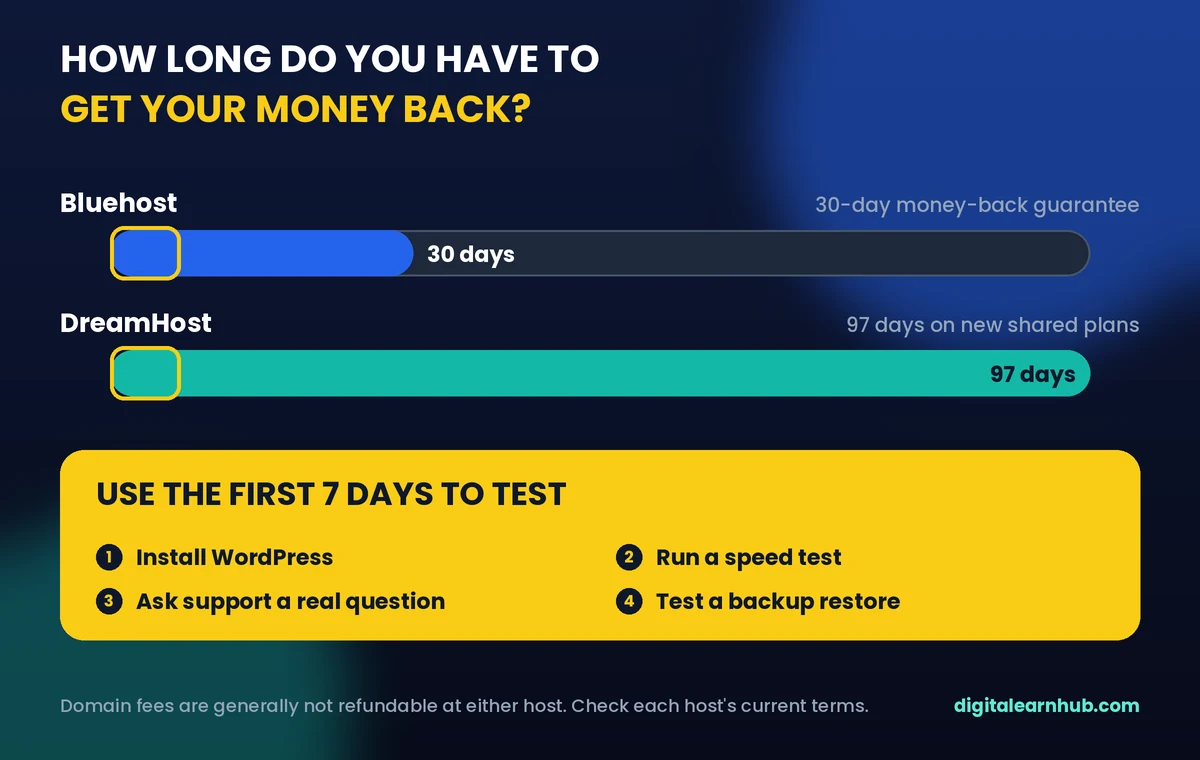
- Refund window: 30 days at Bluehost, 97 days on DreamHost shared plans. DreamHost's longer window needs a credit or debit card payment, per one review, and domain fees aren't refundable at either host.
- Getting your money back: at DreamHost you can cancel in the control panel. At Bluehost, you can switch off auto-renewal yourself, but a refund request goes through support by chat or phone.
- Support speed: Bluehost was faster to reach in Crazy Egg's testing, including by phone. DreamHost relies on chat and tickets, and its phone callback is a paid add-on. In one older survey, DreamHost scored higher on support quality, so experience varies.
The 7-Day Test Plan (Use the Refund Window)
A refund window only helps if you use it. Whichever host you pick, spend the first week testing it, before the 30-day clock at Bluehost runs down.
- Day 1: install WordPress, set up SSL, and check you can log in and find the settings.
- Day 2: add your theme and key plugins, then run PageSpeed Insights on mobile.
- Day 3: import your real content or a test copy of your site.
- Day 4: contact support with a real technical question and time the reply.
- Day 5: run a backup and test a restore.
- Day 6: test email, contact forms and, if you sell, a test checkout.
- Day 7: decide. Keep it, or request a refund while it's easy.
Where Each Host Falls Short
Bluehost
- Renewal prices rise sharply after the promo term.
- Checkout add-ons and upsells, some pre-selected.
- Domain privacy costs extra on lower plans.
- Refunds and cancellations go through support.
- Server locations aren't clearly disclosed.
DreamHost
- Support can be slower, especially at peak times.
- Phone support is a paid callback.
- Data centers are US only.
- Entry-level ecommerce hosting is less bundled.
- Email is a paid add-on after the promo period on the cheapest plan.
Bluehost or DreamHost: Which Should You Choose?
Stop at the first line that sounds like you.
| If you... | Choose |
|---|---|
| Are new to WordPress and want guided setup | Bluehost |
| Want the lowest price for the first three years | Bluehost (36-month term) |
| Need phone support and fast replies | Bluehost |
| Plan a small WooCommerce store | Bluehost |
| Want month-to-month billing | DreamHost |
| Aren't sure you'll keep the site | DreamHost (97-day guarantee) |
| Care about free domain privacy and easy cancellation | DreamHost |
| Want affordable VPS or cloud for a developer project | DreamHost |
If none of those lines settles it, take Bluehost for a first WordPress site and use the 7-day test. If you're nervous about commitment, take DreamHost's 97 days.
Ready to pick one?
Both have a refund window, so you can test either with limited risk.
Get Bluehost → See DreamHost plans →What If Neither Fits?
People comparing Bluehost and DreamHost often look at a few more names, such as HostGator, SiteGround and GoDaddy. We haven't compared those here. If your site will outgrow shared hosting, look at Hostinger for low-cost VPS and cloud, or Cloudways for managed cloud hosting. And if you're heading for a bigger server, our guide to a dedicated hosting service explains when it's worth it.
Mistakes to Avoid When Buying Hosting
- Choosing only on the promo price. Always check the renewal price.
- Accepting every checkout add-on. Untick what you don't need.
- Forgetting auto-renew. Set a reminder before your term ends.
- Not testing during the refund window. Use the 7-day plan.
- Buying the domain from your host by default. Domains can be cheaper at a standalone registrar, and they aren't refundable at the host.
- Skipping backups. Keep your own copy, whichever host you pick.
Frequently Asked Questions
Bluehost vs DreamHost: which is better?
For most first-time WordPress site owners, Bluehost is the easier start, with guided setup, faster support and a low first-term price if you commit for 36 months. DreamHost is better if you want month-to-month billing, the longest refund window (97 days on shared plans), free domain privacy and easier cancellation.
Is Bluehost or DreamHost cheaper?
It depends on your timeline. Bluehost's lowest price needs a long prepaid term, so it's usually cheaper over the first three years. DreamHost offers a lower entry price on a one-year term and a flat month-to-month rate, which can be cheaper if you stay four years or more or leave early. Check the checkout price, because both raise rates at renewal.
Is DreamHost or Bluehost better for WordPress?
Both work well for WordPress, and both install it in a few clicks. Bluehost leans toward beginners with guided onboarding and a WordPress-focused dashboard. DreamHost offers pre-installed WordPress, automatic updates and a managed option called DreamPress. Check WordPress.org's hosting page for the current recommended list.
Which has the better money-back guarantee, Bluehost or DreamHost?
DreamHost, by a wide margin. It offers 97 days on new shared hosting plans, while Bluehost offers 30 days. VPS, dedicated and managed WordPress plans have different terms, and domain fees are generally not refundable.
Which host has better support, Bluehost or DreamHost?
Both offer 24/7 support. Independent testing found Bluehost faster to reach, including by phone, while DreamHost leans on chat and tickets, with phone callbacks as a paid add-on.
What about Bluehost vs DreamHost on Reddit?
Reddit opinions are mixed and often reflect older experiences. In independent reviews, the recurring complaints are Bluehost's renewal prices and checkout upsells, and slower support response times at DreamHost. Check the date on any thread and test the host yourself during the refund window.
Bluehost vs DreamHost vs GoDaddy: how do they compare?
GoDaddy is mainly known for domains and has a different pricing structure, and we haven't compared it in this guide. If you're comparing several hosts, check each on renewal price, refund window, support, and how your site performs in a real test.
AWS vs DreamHost: which should I choose?
AWS is a flexible cloud platform aimed at developers and teams who manage their own infrastructure. DreamHost is a simpler hosting service with a control panel, shared plans and managed WordPress. If you aren't a developer, a hosting company like DreamHost or Bluehost is usually easier.
Which is faster, Bluehost or DreamHost?
Independent tests disagree. One publisher's ongoing monitoring found Bluehost faster in most US locations and with higher uptime from August to October 2026, while another found little difference for typical sites. Test your own site, with your own theme and plugins, before committing.
Can I switch from Bluehost to DreamHost, or the other way?
Yes. You can migrate WordPress with a plugin or ask the new host about migration help. Back up first, test the new site on a temporary URL, lower your DNS TTL before switching, and keep the old host active for a few days.
Final Thoughts
In the Bluehost vs DreamHost question, there's no universal winner, only a better fit. Bluehost is the easier start and the cheaper three-year deal for most new WordPress site owners. DreamHost is the safer bet if you want flexibility, a long refund window and a simple exit.
Pick the one that matches how you'd feel if you were wrong. If a high renewal bill would sting more, lean DreamHost. If a slow, fiddly setup would sting more, lean Bluehost. Then run the 7-day test and let your own site decide.
Start with the host that fits you
Compare current plans and prices, then test during the refund window.
See Bluehost plans → See DreamHost plans →