Your theme is the salesperson who works every hour your store is open, and it never gets tired, never gets rude, and never forgets to offer the bundle. That’s why picking one of the best Shopify themes for dropshipping matters more than picking a pretty colour palette. A good theme turns browsers into buyers. A weak one leaks them.
My top pick for one-product and ad-driven dropshipping stores is the Shrine Theme. This guide explains why, who it’s wrong for, how it compares with five other popular themes, and how to test any theme in 30 minutes before you pay.
Prices and details last checked: November 2026. Theme prices and offers change, so confirm on each seller’s site. Heads-up: this page contains affiliate links, explained at the bottom.
The Short Verdict
- Best overall for one-product and ad-driven stores: Shrine Theme. Bundles, quantity breaks, upsells and urgency elements are built in, for a one-time price.
- Best free start: Dawn. Fast, simple and officially supported.
- Best for promotion-heavy stores: Impulse.
- Skip Shrine if you run a large catalog, a slow premium brand, or you need Shopify Theme Store support.
What the Best Shopify Themes for Dropshipping Actually Do
A dropshipping store has an unusual problem: you usually send cold traffic to a store with no brand, no reviews and no history. A theme can’t fix a bad product, but it can control five things that decide whether a visitor stays:
- Speed on mobile. Most paid social traffic arrives on a phone, and slow pages lose it.
- The offer. Bundles, quantity discounts and clear pricing lift the value of each order.
- Trust. Reviews, guarantees and clear shipping information reduce doubt.
- Checkout friction. A clean cart and quick checkout buttons mean fewer abandoned carts.
- App dependence. Every app you add can slow the store and adds a monthly bill.
That last point is where a theme like Shrine earns its place, and we’ll get to the math shortly.
Having built and managed multiple Shopify stores, I’ve learned that choosing the right theme is about more than just appearance. I look for a theme that loads quickly, works smoothly on mobile, offers easy customization, and makes the buying process simple. I’ve seen how slow loading times, cluttered layouts, and confusing navigation can frustrate visitors and cost potential sales. For me, a good Shopify theme should build trust, showcase products professionally, and help turn visitors into customers.
Quick Comparison: Best Shopify Themes for Dropshipping
Prices come from 2026 guides and the sellers’ own listings, so treat them as a guide and check before you buy.
| Theme | Price (as listed) | Best for | Main strength | Watch out for |
|---|---|---|---|---|
| Shrine | One-time: Lite about $49, Standard about $149, Pro about $349 | One-product and small-catalog stores with paid traffic | Built-in bundles, quantity breaks, upsells, urgency | Not on the Shopify Theme Store; mixed support reviews |
| Dawn | Free | Beginners and testing | Fast, simple, officially supported | Few conversion tools out of the box |
| Horizon | Free | Stores that want more design flexibility | Newer Shopify theme with flexible layouts | Fewer dropshipping-specific tools |
| Impulse | About $400 to $500 one-time | Promotion-heavy and fashion stores | Strong Theme Store reviews, flexible sections | Higher upfront price |
| Booster | Listed at about $199 a year or $299 one-time | High-volume dropshipping stores | Built with dropshipping in mind | Weaker speed results in one 2026 dataset |
| Debutify | Subscription plans, from free to about $149 a month | Beginners who want built-in tools | Add-on system and trial | Ongoing monthly cost on higher plans |
One more thing worth knowing: a 2026 dataset of dropshipping stores found that real-world speed varies a lot. Around 70% of stores on Dawn passed Core Web Vitals, while Booster stores landed in the mid-40s. The theme matters, but so do your apps and images. You can browse the data at Shop Theme Detector.
Shrine Theme Review: Why It’s My Pick for Dropshipping
Shrine is a paid Shopify theme made by Shrine Solutions. It’s built for one purpose: converting visitors on dropshipping and one-product stores. It’s sold directly by the seller rather than through the Shopify Theme Store, and it’s priced as a one-time purchase rather than a monthly subscription.
What Shrine includes
According to its listings and independent write-ups, Shrine focuses on features that raise the value of each order:
- Bundle deals and quantity breaks that encourage bigger baskets.
- Urgency text and bars for limited-time offers.
- Complementary product upsells, including cart-drawer features.
- A variant picker, product ratings and reviews blocks.
- Shoppable videos for social-style product pages.
The reasoning is simple. Instead of renting separate apps for bundles, upsells and countdowns, you pay once for a theme that has them built in.
Shrine Lite, Standard and Pro
| Tier | Listed price | Who it suits |
|---|---|---|
| Lite | About $49 | New stores and first tests |
| Standard | About $149 | Most growing dropshipping stores |
| Pro | About $349 | High-volume, ad-driven brands |
One 2026 listing says the standard and Pro tiers include lifetime access with free updates for the first year. Confirm the update terms on Shrine’s site before you pay.
The pros and cons, honestly
What I like
- Conversion tools are built in, not bolted on.
- One-time price, so no monthly theme bill.
- A strong fit for one-product and focused stores.
- Can reduce how many apps you need.
What to watch
- It’s not on the Shopify Theme Store, so there’s no Theme Store review or rating.
- Public support reviews are mixed, so test it first.
- Not designed for big catalogs or slow premium brands.
- You may still need apps for reviews, email or complex variants.
My take: if you run a single hero product or a lean catalog and depend on ads, Shrine gives you the tools you’d otherwise assemble from apps. If you sell hundreds of products or care most about a refined brand feel, look at Dawn, Horizon or Impulse instead.
Ready to try Shrine?
Buy it from the official seller, then test it on a draft theme before you publish.
Get Shrine Theme → Start your Shopify free trial →The Theme vs Apps Math
Here’s the question that matters: does the theme cost less than the apps it replaces? Enter your own numbers. The defaults are examples only.
Theme vs Apps Cost Calculator
With the example numbers, a $149 theme that lets you drop $30 of monthly apps breaks even in under five months. If you’d drop nothing, the theme is a pure upgrade cost, and Dawn plus the apps you already use might be smarter. That honest answer is why the test in the next section matters.
If you’re also checking your margins, use our free dropshipping profit calculator.
The Other Best Shopify Themes for Dropshipping
Dawn: best free theme
Dawn is Shopify’s default free theme, and it’s the most common theme among dropshipping stores in the dataset linked above. It’s fast, clean and officially supported. It’s also a blank foundation, so you’ll add conversion features yourself with apps. Best for: beginners and product testing.
Horizon: best newer free option
Horizon is another free Shopify theme with flexible layouts and a more modern feel. It’s a good choice if you want design freedom without paying. It isn’t built around dropshipping tools, so expect to add apps. Best for: stores that want polish on a zero budget.
Impulse: best for promotions
Impulse comes from Archetype Themes and has a strong record on the Shopify Theme Store, with around 94% positive reviews across more than 1,200 reviews in one 2026 summary. It handles promotions and large catalogs well. The price is higher, at roughly $400 to $500. Best for: stores that already earn steadily and run frequent sales.
Booster: built with dropshipping in mind
Booster is designed for high-volume dropshipping with conversion tools included. One 2026 dataset showed weaker real-world speed scores for Booster stores than for Dawn, so test it with your own apps before you commit. Best for: sellers who want a dropshipping-first theme.
Debutify: best for beginners who like add-ons
Debutify takes a subscription approach, with plans from free up to around $149 a month in one review. It includes an add-on system for conversion features and offers a trial. Weigh the ongoing cost against a one-time theme. Best for: beginners who want guided, built-in tools.
How to Choose the Right Theme
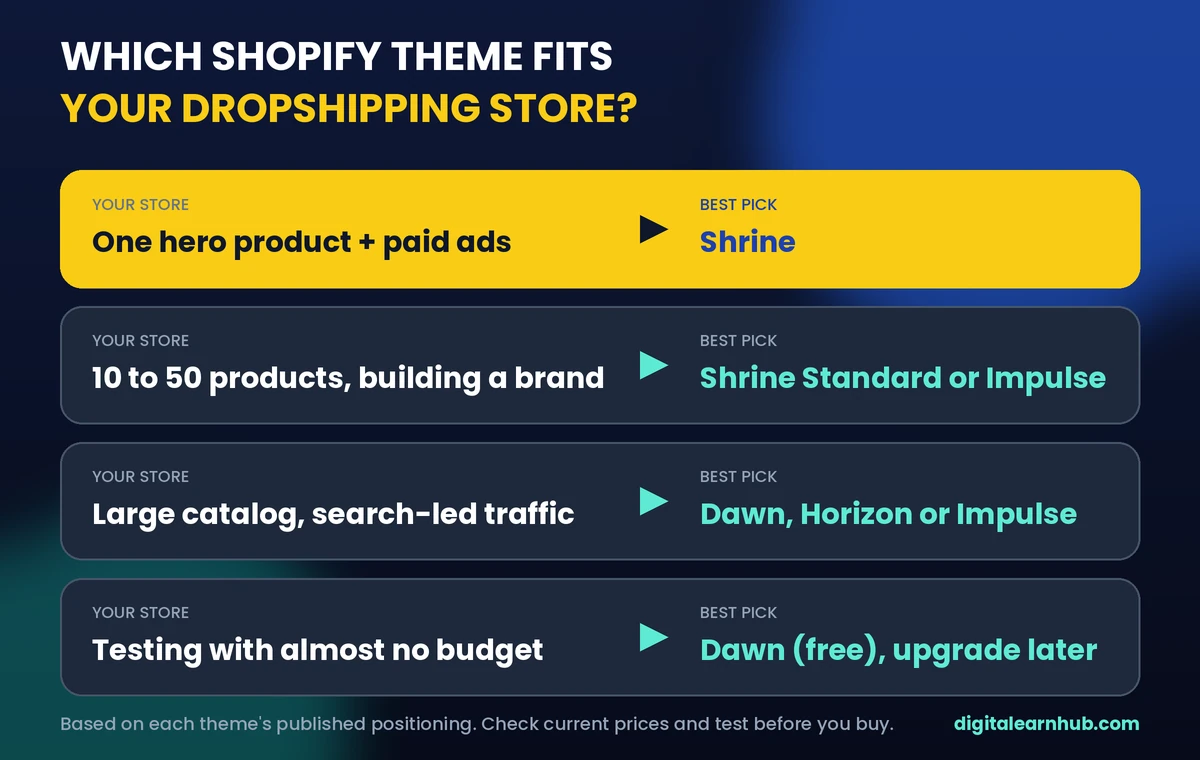
| Your store | Pick | Why |
|---|---|---|
| One hero product, running paid ads | Shrine | Offer-focused features built in |
| 10 to 50 products, building a brand | Shrine Standard or Impulse | Conversion tools plus flexible sections |
| Large catalog, search-led traffic | Dawn, Horizon or Impulse | Better collection pages and filtering |
| Testing with almost no budget | Dawn | Free, fast, easy to upgrade from |
| Fashion with frequent promotions | Impulse | Strong promo and merchandising tools |
Where your traffic comes from matters too. If you rely on short-form video and paid ads, a one-product conversion theme makes sense. If you rely on Google search and want to rank, strong collection pages and fast loading matter more. If you’re still researching products, tools like Minea and PiPiAds can help you see what’s being advertised, and CJdropshipping and HyperSKU are two options for sourcing and fulfillment.
The 30-Minute Theme Test
Never buy a theme on the strength of a demo or a review, including this one. Spend 30 minutes testing it.
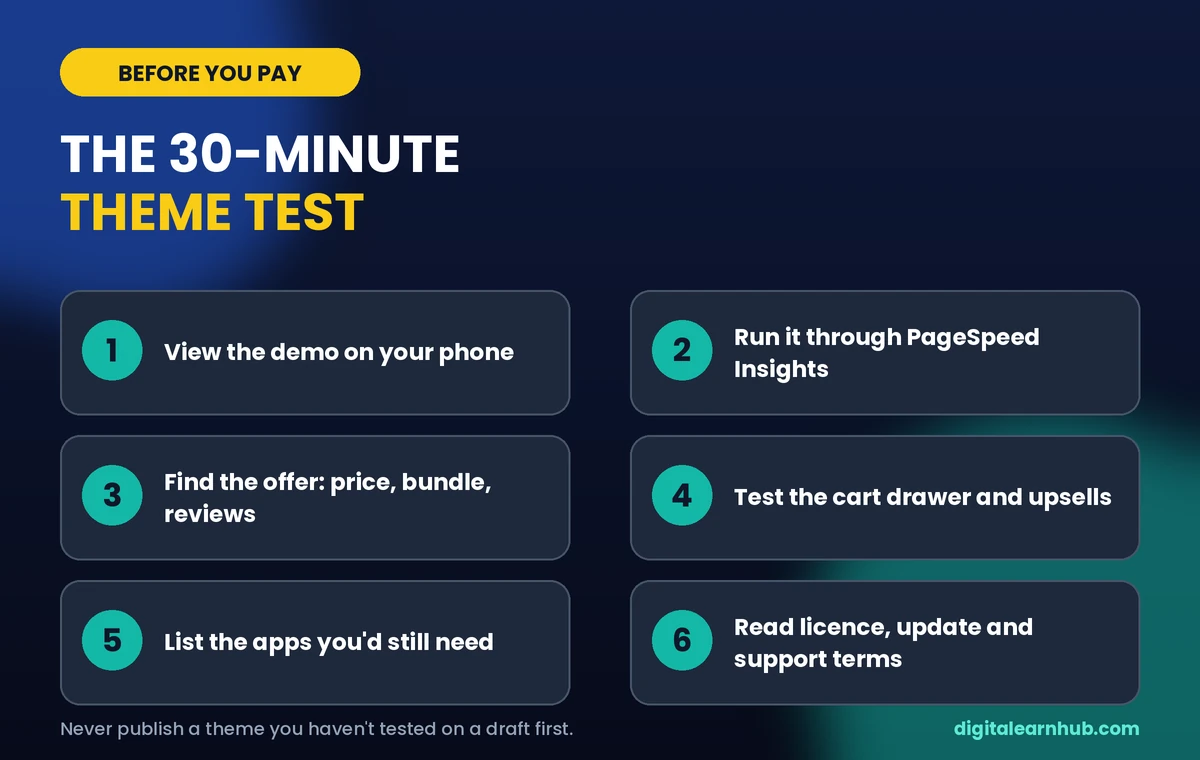
- Open the demo on your phone. Is the product page clear in the first screen?
- Run the demo through Google PageSpeed Insights. Note the mobile score, but remember your own images and apps will change it.
- Find the offer. Can you see price, bundle, reviews and guarantee without scrolling forever?
- Test the cart. Does the drawer show upsells and a clear checkout button?
- List the apps you’d still need. Then price them.
- Read the licence, update and support terms, and check recent public reviews.
Then upload the theme to a draft, load your real product and images, and run through checkout once yourself.
How to Install and Set Up Your Theme
- Back up your current theme. In Shopify, duplicate it first.
- Buy from the official seller and download the theme’s zip file.
- In your Shopify admin, go to Online Store, then Themes, then Add theme, and upload the zip.
- Customize in the theme editor. Add your product, bundles and offer.
- Test on mobile and desktop, then place a test order.
- Publish when you’re happy, and keep the old theme for a while as a backup.
New to Shopify? Start with a free trial and read our Etsy vs Shopify guide to see how it compares with a marketplace. Once your store is live, you need traffic, and platforms like TikTok for Business are one way to find it. Our profitable affiliate niches guide can also help you think about which niches pay.
Mistakes That Kill Conversions, Even With a Great Theme
- Downloading “free” or cracked copies. They break the licence, get no updates and can contain malicious code.
- Stacking too many apps. Each one can slow the store and adds a monthly bill.
- Using huge, uncompressed images. Speed starts with your files.
- No clear offer. A theme can display a bundle, but you have to create it.
- Changing themes mid-test. You can’t tell what worked.
- Ignoring mobile checkout. Place a test order on your phone.
- Expecting a theme to fix a weak product. It can’t.
Frequently Asked Questions
What are the best Shopify themes for dropshipping?
Popular picks include Shrine for one-product and ad-driven stores, Dawn as the free starting point, Impulse for stores that run lots of promotions, Booster for high-volume stores, and Debutify for beginners who want built-in tools. The right one depends on your catalog size and where your traffic comes from.
Is Shrine Theme worth it for dropshipping?
It can be if you run a one-product or small-catalog store with paid traffic. It builds in bundles, quantity breaks, upsells and urgency elements for a one-time price, which may replace some paid apps. It’s less suitable for large catalogs or slow, premium brands.
How much does Shrine Theme cost?
As listed in 2026 sources, Shrine is a one-time payment, with Lite at about $49, the standard theme at about $149, and Pro at about $349. Check Shrine’s own site for current pricing, update terms and what each tier includes.
Is Shrine Theme on the Shopify Theme Store?
No. It’s sold directly by Shrine Solutions, so it doesn’t carry Shopify Theme Store review or public Theme Store ratings. Read the license, refund and support terms before buying.
Should I use a free or paid Shopify theme for dropshipping?
If you’re still validating a product, start free with Dawn. Once you have steady traffic and a clear offer, a conversion-focused paid theme can pay for itself, especially if it replaces apps you’d otherwise rent every month.
Shrine vs Dawn: which is better?
Dawn is free, fast and officially supported, but it’s a blank foundation. Shrine adds conversion features like bundles, quantity breaks and cart upsells. Choose Dawn to test cheaply, and Shrine when you’re ready to push conversions on a focused store.
Do I still need apps if I use Shrine?
Probably a few. Shrine covers many conversion features, but you may still want apps for reviews, email, order tracking or advanced variant setups. Make a list during your test, as described above, before you pay.
Can I use Shrine for a large store with hundreds of products?
It’s built mainly for one-product and small-catalog stores. For a large catalog, a theme designed for strong collection pages and filtering, such as Dawn, Horizon or Impulse, is usually a better fit.
Are ‘free download’ Shrine themes safe?
No. Copies sold or shared outside the official seller break the license, don’t get updates, and can contain malicious code. Buy only from the official seller.
How do I install a premium Shopify theme?
In your Shopify admin, go to Online Store, then Themes, choose Add theme, and upload the theme’s zip file. Customize it in the theme editor and preview it on a draft before publishing. Always keep your current theme as a backup.
Final Thoughts
The best Shopify themes for dropshipping are the ones that match your store: a focused theme for a one-product, ad-driven shop, and a flexible one for a bigger catalog. For the first kind, Shrine is the one I’d start with, because it packs the offer-building tools into a one-time price.
But don’t take anyone’s word for it. Run the 30-minute test, price the apps you’d drop, and let your own numbers decide. If you want to try it, you can do it with very little risk.
Build your store the smart way
Start your store on Shopify, then add a theme built to convert.
Start your free Shopify trial → Get Shrine Theme →