The best email marketing for Shopify stores isn’t one tool. It’s the tool that fits where your store is right now. A brand-new shop doesn’t need the same setup as a store sending to 20,000 customers, and paying for the wrong one is the easiest way to waste money.
This guide ranks the options by store stage, shows what each really costs at 500 and 10,000 contacts, and tells you when it’s worth upgrading. You’ll also get the five emails to build first, whichever tool you choose.
Prices and plans last checked: November 2026. Email tools change their pricing often, so confirm before you buy. Heads-up: this page contains affiliate links, explained at the bottom.
The Quick Verdict
- Just starting: Shopify Messaging. It’s built into Shopify, and the first 10,000 emails a month are free.
- Growing, on a budget: Omnisend. Built for ecommerce and usually cheaper than Klaviyo.
- Data-heavy and scaling: Klaviyo. The deepest segmentation, and worth it once email drives real revenue.
- Email plus funnels and webinars: GetResponse.
- Creator-led store or simple needs: Kit or AWeber.
The Best Email Marketing for Shopify Stores Compared
If you’re weighing Shopify email marketing options, start with this side-by-side view. The details for each follow below.
| Tool | Best for | Free plan | Paid from | Watch out for |
|---|---|---|---|---|
| Shopify Messaging | New stores and simple sends | 10,000 emails/month free | About $1 per extra 1,000 emails | Lighter automation than dedicated tools |
| Omnisend | Growing stores wanting value | 250 contacts, 500 emails/month | $16/mo (Standard) | SMS needs the Pro plan; less depth than Klaviyo |
| Klaviyo | Data-driven, scaling stores | 250 profiles, 500 emails/month | $20/mo at 251 to 500 contacts | Costs climb with list size |
| Mailchimp | Stores that want a familiar tool | 250 contacts | About $13/mo | Reported to bill for unsubscribed contacts |
| GetResponse | Email plus funnels and webinars | Trial, check current terms | Check current plans | Ecommerce features sit on higher plans |
| Kit | Creator-led stores, digital products | Check current terms | Check current plans | Not built around deep ecommerce flows |
| AWeber | Simple email with phone support | Check current terms | Check current plans | Lighter Shopify depth |
| Beehiiv | Newsletter-first brands | Check current terms | Check current plans | Not an ecommerce automation engine |
Plan details come from each vendor’s published pricing and 2026 reviews, which don’t always agree. Confirm on the vendor’s site before buying.
Which One to Use at Each Stage
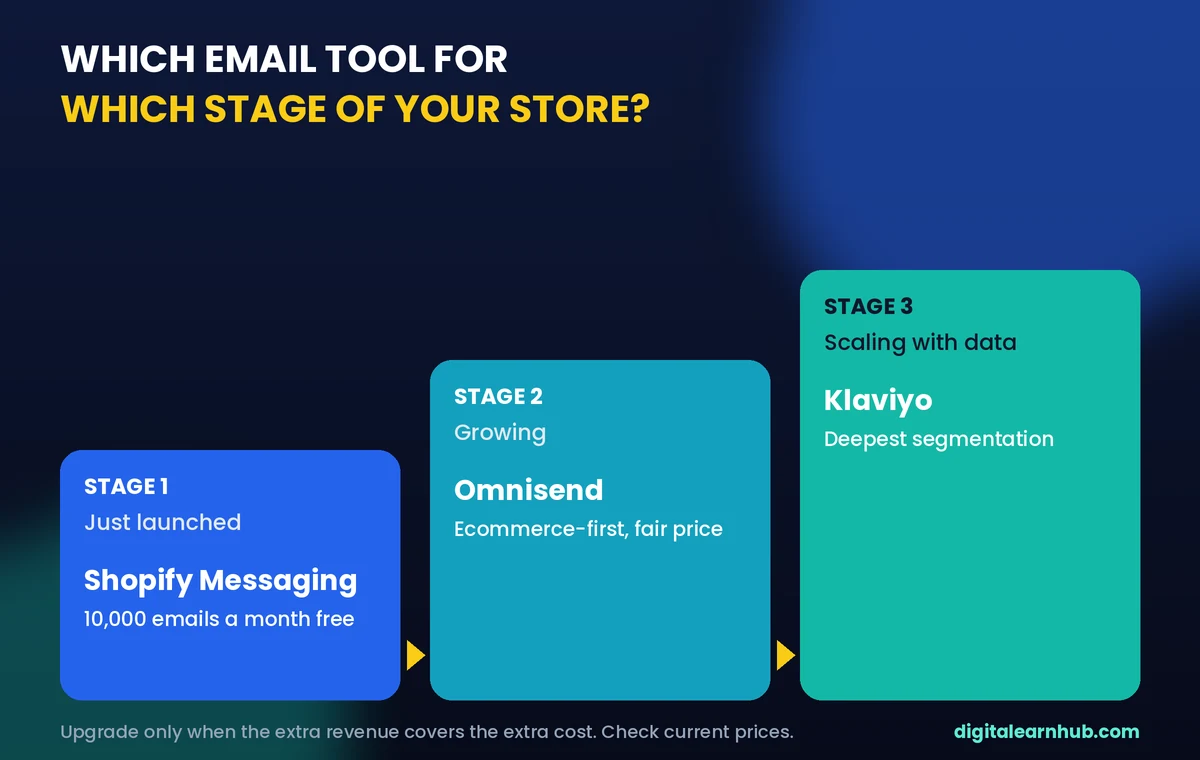
Stage 1: Just launched. Use Shopify Messaging.
Shopify’s built-in tool, now called Shopify Messaging (formerly Shopify Email), is already in your admin. Your products, customers and orders are already there, so there’s nothing to sync. Every paid Shopify plan gets 10,000 free emails a month, and extra emails cost about $1 per 1,000. Abandoned checkout automations don’t count toward the free allowance, per one 2026 review.
Best for: new stores and anyone testing email before paying for a dedicated tool. Limit: automation depth and segmentation are lighter than the specialists. If you don’t have a store yet, you can start a Shopify trial here.
Stage 2: Growing. Use Omnisend.
Omnisend is built for ecommerce. Its free plan covers 250 contacts and 500 emails a month, Standard costs $16 a month at 500 contacts, and Pro starts at $59 for 2,500 contacts with unlimited email. At 10,000 contacts, 2026 price checks put Standard around $132, below Klaviyo’s $150.
Best for: stores that want strong ready-made automations and a friendlier price. Limit: its segmentation and predictions trail Klaviyo’s, and SMS requires Pro. You can look at it directly at omnisend.com.
Stage 3: Scaling with real data. Use Klaviyo.
Klaviyo is the default pick for serious Shopify stores, because it turns product, order and browsing behavior into targeted messages. The free plan covers 250 active profiles and 500 emails a month and stops sending once you pass those limits. The email plan is $20 a month at 500 profiles, $30 at 1,000 and $150 at 10,000.
Best for: stores with enough customer data to act on, and someone who will use it. Different roundups put the point where it pays off at roughly $20,000 to $50,000 a month in revenue. Limit: the price climbs steadily as your list grows. See the plans at klaviyo.com.
What It Really Costs
Here are published US prices for the entry plans at two list sizes. Shopify Messaging bills by email sent, not by contact, so I assumed 4 emails per contact each month.
| Tool | 500 contacts | 10,000 contacts |
|---|---|---|
| Shopify Messaging | Free | About $30 (40,000 emails, first 10,000 free) |
| Omnisend (Standard) | $16 | About $132 |
| Mailchimp (Standard) | Check current price | About $135 |
| Klaviyo (Email) | $20 | $150 |
These come from vendor pricing pages as read by third-party reviewers in September to November 2026, so confirm current prices before you decide.
The upgrade test: is the pricier tool worth it?
Switching tools costs time, so don’t do it on a hunch. Use this check: the extra monthly cost, divided by your profit margin, is the extra revenue the new tool must bring in just to break even.
Upgrade Test Calculator
The defaults compare Shopify Messaging with Klaviyo at 10,000 contacts. Change them to your own numbers.
With the defaults, that's about $300 of extra monthly revenue. If better segmentation and flows plausibly deliver that, the upgrade pays for itself. If you can't point to where it would come from, stay put.
No store yet?
Set up on Shopify first, then add email. You can try it before you commit.
Start your free Shopify trial →Where GetResponse, Kit, AWeber and Beehiiv Fit
These four aren't the usual first picks for Shopify, but each has a real use case. Here's an honest look at when they make sense.
- GetResponse. It has a native Shopify integration that imports customers, products and orders, and supports abandoned cart and price-drop campaigns, product recommendations, segmentation, promo codes and pop-ups. It also covers funnels and webinars, so it suits a store that sells through content. Check which plan unlocks the ecommerce automations.
- Kit (formerly ConvertKit). Built for creators, with landing pages and digital product sales. A good fit if your store grows out of an audience, such as a creator selling merch or products. It isn't built around abandoned checkout and purchase-based flows, so confirm what it syncs from Shopify.
- AWeber. Simple, beginner-friendly email with templates and phone support on paid plans, and it connects with Shopify. Best for small stores that value help over advanced automation.
- Beehiiv. Built for newsletters and publishing. Choose it if your brand is a newsletter first and a store second. It's not designed for ecommerce automation.
If abandoned checkout, post-purchase flows and product-based segments are your priority, Shopify Messaging, Omnisend and Klaviyo are the safer starting points.
The 5 Flows to Build First (Whatever Tool You Pick)
A tool is only as good as the emails you set up. These five flows do most of the work.
- Welcome series. Introduce your brand and give new subscribers a reason to buy. Start with 2 to 3 emails over about a week.
- Abandoned checkout. Remind shoppers about what they left. A common starting point is one email within an hour, a second the next day, and a third a day or two later.
- Post-purchase. Thank them, set delivery expectations, and ask for a review later.
- Win-back. Reach customers who haven't bought in a while.
- Browse abandonment. Follow up with people who viewed products but didn't add to cart, if your tool supports it.
Subject lines matter in every one of them. Try ours in the free email subject line tester.
Deliverability and Compliance
The best tool can't help if your emails land in spam. Do these before your first campaign.
- Send from your own domain, not a free mailbox address.
- Set up SPF, DKIM and DMARC. Your email tool's help pages show where to add them.
- Include a clear, one-click unsubscribe, and honor requests quickly.
- Keep spam complaints low. Google's sender guidelines set requirements for bulk senders, and Yahoo has similar rules.
- Only email people who opted in. In the US, the CAN-SPAM Act sets the basics. The UK, EU and other regions have stricter consent rules, so check yours.
Pick Yours in 5 Minutes
Stop at the first line that sounds like you.
| If you... | Choose |
|---|---|
| Just launched and want to spend nothing | Shopify Messaging |
| Want ecommerce automations at a fair price | Omnisend |
| Have lots of customer data and a growing list | Klaviyo |
| Sell through content, funnels or webinars as well | GetResponse |
| Are a creator selling products to your audience | Kit |
| Want simple email with human help | AWeber |
| Run a newsletter-first brand | Beehiiv |
If you're still setting up your store, our guide to the best Shopify themes for dropshipping and our Etsy vs Shopify comparison are good next reads.
Mistakes to Avoid
- Paying for a bigger tool too early. Start free and upgrade when the numbers justify it.
- Skipping domain authentication. This is the most common reason emails go to spam.
- Blasting the whole list. Segment by behavior, even just buyers vs non-buyers.
- Building campaigns before flows. Automations earn money while you sleep.
- Ignoring list quality. A smaller, engaged list beats a large cold one.
- Not testing. Test subject lines and send times.
Frequently Asked Questions
What is the best email marketing for Shopify stores?
It depends on your stage. New stores can start free with Shopify Messaging, growing stores often get the best value from Omnisend, and data-heavy stores doing serious volume usually move to Klaviyo. Creator-led stores or stores that also run webinars and funnels may prefer Kit or GetResponse.
Is Shopify Email free?
Mostly. Shopify's built-in tool, now called Shopify Messaging (formerly Shopify Email), includes 10,000 free emails a month on paid Shopify plans, then about $1 per 1,000 extra emails. Abandoned checkout automations don't count toward the free allowance, according to one 2026 review.
Klaviyo vs Omnisend: which is better for Shopify?
Klaviyo is deeper on segmentation and predictive data, so it suits stores that act on behavior and purchase history. Omnisend usually costs less at the same list size and is easier to start with. At 10,000 contacts, published 2026 prices were about $150 a month for Klaviyo's email plan and $132 for Omnisend Standard.
What is the cheapest email marketing for Shopify?
Shopify Messaging is the cheapest for most small stores, because the first 10,000 emails a month are free. Klaviyo and Omnisend also have free plans, but they cap you at 250 contacts and 500 emails a month.
Do I need a separate email tool if I use Shopify?
Not at the start. Shopify's built-in tool covers newsletters and basic automations. Add a dedicated tool when you want deeper segmentation, more automation, SMS, or more control over deliverability.
Can I use Kit, AWeber or Beehiiv with a Shopify store?
Yes, though they're not built around ecommerce the way Klaviyo and Omnisend are. Kit is aimed at creators, AWeber at simple email with phone support, and Beehiiv at newsletters. Check exactly which Shopify data each one syncs before you commit, especially for abandoned checkout and purchase-based flows.
When should I switch from Shopify Messaging to Klaviyo?
Switch when the extra revenue clearly covers the extra cost. Divide the monthly cost difference by your profit margin to see how much additional monthly revenue you'd need. If your segmentation, flows and reporting needs have outgrown the basics, it's usually time.
What emails should a Shopify store send first?
Start with five flows: a welcome series, an abandoned checkout reminder, a post-purchase thank-you with a review request, a win-back email for lapsed customers, and a browse abandonment email if your tool supports it.
How do I keep Shopify marketing emails out of spam?
Send from your own domain, set up SPF, DKIM and DMARC, include a one-click unsubscribe, keep complaint rates low and only email people who opted in. Google and Yahoo require these for bulk senders.
Is email marketing worth it for a small Shopify store?
Usually, yes. Email lets you reach people who already showed interest, without paying for every click. Results vary by product and list quality, and you should expect them to build over months rather than days.
Final Thoughts
For most stores, the best email marketing for Shopify is a ladder, not a single choice. Start with Shopify Messaging, move to Omnisend as you grow, and consider Klaviyo when email brings in enough revenue to justify the cost. Use GetResponse, Kit, AWeber or Beehiiv when your business really fits what they do well.
Build the five flows, set up your domain properly, and run the upgrade test before you pay for more. That's how you avoid overpaying and still get the sales.
Ready to grow your store with email?
Start your store, then build your first flows this week.
Start your free Shopify trial → Explore GetResponse →