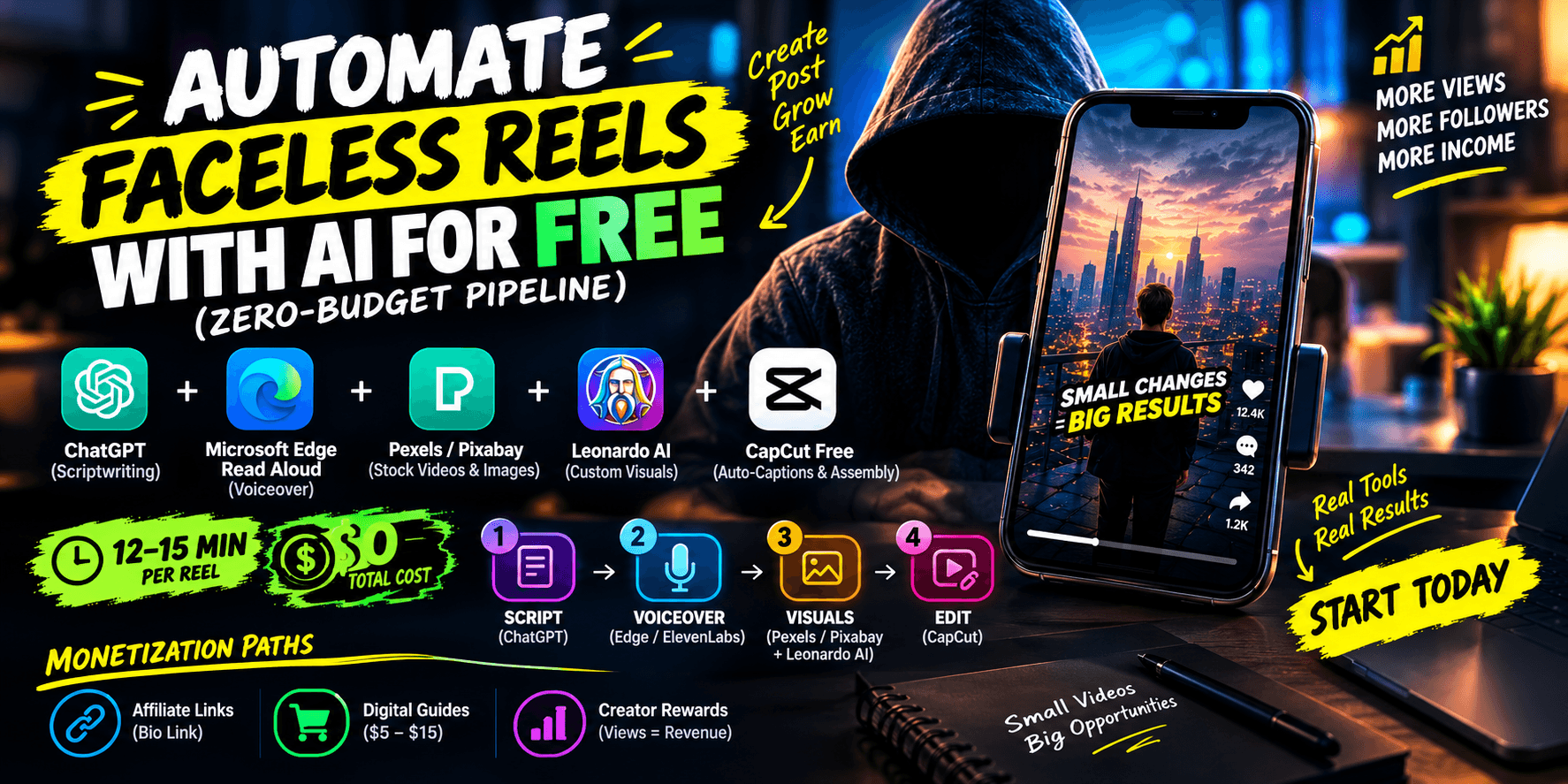
To automate faceless Instagram Reels or TikTok videos for free, you do not need expensive $50/month SaaS suites. The most reliable zero-budget stack combines ChatGPT (scriptwriting), Microsoft Edge Read Aloud or ElevenLabs free tier (voiceover), Pexels/Pixabay and Leonardo AI (visual assets), and CapCut Free (auto-captions and assembly).
- Total daily production time: 12 to 15 minutes per Reel.
- Out-of-pocket cost: $0.
- Primary monetization path: Affiliate links in bio, digital guides, and platform creator rewards.
The $0 Tool Stack (No Paid Subscriptions)
Most "automated" AI video platforms cap your exports at 720p or plaster an ugly watermark across the center of your clip unless you pay.
To build a channel that you can actually monetize, stitch together these four free tools instead:
- Scripting: ChatGPT (GPT-4o mini) or Claude Free.
- Voice Generation: Microsoft Edge "Read Aloud" (via an audio loopback or free browser extension) or the free monthly allowance on ElevenLabs.
- B-Roll & Visuals: Pexels/Pixabay for 4K stock video, and Leonardo.ai (150 free daily generation tokens) for custom cinematic graphics.
- Assembly & Sync: CapCut Desktop or Web (completely free auto-captions with custom animation styles).
Step 1: Generate High-Retention Scripts (The 30-Second Formula)
Faceless accounts fail when scripts ramble. Short-form algorithms prioritize watch time percentage; a 25-second video that gets watched 1.2 times will outperform a 60-second video that loses viewers at second 4.
Open your AI writer and paste this exact prompt:
"Write a 25-second (approx. 55-65 words) vertical reel script about [Your Niche Topic, e.g., 3 psychological tricks to stop procrastination].
Rule 1: The first sentence must be a disruptive hook with zero greetings.
Rule 2: Deliver three punchy tips in one breath each.
Rule 3: End abruptly on an open loop or simple CTA: 'Save this before you scroll.' Do not include intro or outro music cues."
The Pitfall to Avoid: Never let the AI start with "Hey guys, welcome back to my channel." That single phrase drops average view duration by over 40% on Reels and TikTok.
Step 2: Generate Natural-Sounding Voiceovers
Viewers swipe away immediately if a voice sounds like an old GPS navigation unit.
- If you use ElevenLabs, choose subtle, conversational voices (like Adam, Charlie, or Rachel) rather than dramatic movie-trailer voices.
- If you have run out of free credits, open your script in a clean browser window on Microsoft Edge, select the text, right-click, and click Read Aloud. Choose Natural Microsoft Ryan or Jenny. Record the audio output using a free tool like Audacity.
Pro Setting: Speed the final audio track up by 1.05x to 1.1x in your editor. Modern short-form audiences have little patience for slow speaking cadence.
Step 3: Source Dynamic Background Clips
You need a visual change every 1.5 to 2.5 seconds to prevent drop-off. For a 25-second Reel, you need roughly 8 to 10 short visual clips.
- Stock Footage: Head to Pexels Video. Filter for "Vertical" orientation. Search mood-based terms rather than literal objects—terms like “moody rain office”, “neon coding”, “minimalist aesthetic desk”, or “city night drive”.
- AI-Generated Art: If your niche is storytelling, history, or philosophy, go to Leonardo.ai. Generate 9:16 vertical images using the "Cinematic" preset.
The Pitfall to Avoid: Avoid using the exact same luxury supercar or private jet stock clips everyone else downloads from YouTube bundles. Instagram's algorithm actively downranks reposted, overused b-roll libraries.
Step 4: Rapid Batch Assembly & Word-by-Word Captions
When I first tried this pipeline, I spent an hour trying to sync audio manually before realizing CapCut’s batch alignment cuts that time to 30 seconds.
Bring your voiceover and visual clips into CapCut Desktop:
- Drop your audio voiceover onto the timeline first.
- Trim your background clips so cuts land directly on the pauses between spoken sentences.
- Click Captions > Auto Captions > Create.
- Apply the popular "Active Word" / "Bounce" text style where words highlight in yellow or green as they are spoken.
- Add a subtle, royalty-free lofi or ambient audio track from the built-in library. Set the music volume to -22dB to -25dB so it never drowns out the voice.
Export the file at 1080p, 30fps (or 60fps), and H.264.
Turning Views into Revenue: The 3 Monetization Paths
A faceless reel with 50,000 views is a vanity metric unless there is a clear funnel attached to it. Here is how faceless accounts earn:
- Affiliate Bridge Pages: Place a Beacons or Linktree link in your profile bio. If your channel shares AI automation tips, link to productivity software that pays 30% monthly recurring commissions.
- Low-Ticket Digital Assets: Package the exact prompts, Notion templates, or reading lists you mention in your reels and sell them via Gumroad for $5 to $15.
- Platform Ad Funds: Once you hit the eligibility threshold (e.g., 10k followers on TikTok or YouTube Shorts monetization requirements), the views themselves pay a baseline RPM.
check your potential channel earnings on our YouTube money calculator
FAQs
Can you monetize faceless AI reels on Instagram and TikTok?
Yes. While platform creator funds have specific eligibility criteria, most faceless creators monetize immediately through affiliate bridge links in their bio, selling low-ticket digital products (such as prompt packs and Notion templates via Gumroad), and landing direct brand sponsorships.
What is the best free software stack to automate faceless reels?
The most effective zero-cost stack combines ChatGPT or Claude for scriptwriting, Microsoft Edge Read Aloud or ElevenLabs free allowance for natural text-to-speech voiceovers, Pexels and Leonardo AI for 9:16 vertical b-roll footage, and CapCut Desktop for automated captions and final timeline assembly.
Will social media algorithms penalize 100% AI-generated video content?
Algorithms on Instagram and TikTok prioritize watch time, completions, and shares rather than the tools used to produce the video. However, accounts that repost recycled, low-quality b-roll or use repetitive robotic voice tracks get downranked. Customizing scripts, speeding up natural voices, and pacing dynamic cuts avoids penalties.
How long does it take to batch 14 faceless reels?
Using an assembly-line batching workflow, you can create 14 reels in under 3 hours: 30 minutes for script generation, 25 minutes for batch voiceovers, 40 minutes for asset sourcing, 70 minutes for editing in CapCut, and 15 minutes to schedule the queue.