Getting your Amazon Associates account (or any affiliate program) suspended isn’t dramatic — there’s no warning siren. You just wake up one day, check your dashboard, and see “account under review” or, worse, “terminated.” Months of content, gone from your monetization stack overnight.
Here’s the thing nobody tells new affiliate marketers: most account flags aren’t caused by shady behavior. They’re caused by small, avoidable compliance mistakes — the kind you can fix in an afternoon once you know what to look for.
If you’re building your affiliate blog on a fast foundation like the one we covered in our free WordPress themes guide, don’t let a preventable policy slip-up undo that work. Here’s exactly how to add affiliate links the compliant way.
Disclose Before the Link, Not After
This is the single most common — and most easily fixed — mistake. The FTC requires a clear and conspicuous disclosure before a reader encounters your first affiliate link, not buried in a footer or a separate "About" page they'll never read.
What "clear and conspicuous" actually means:
- Placed near the top of the post, before or alongside the first affiliate link
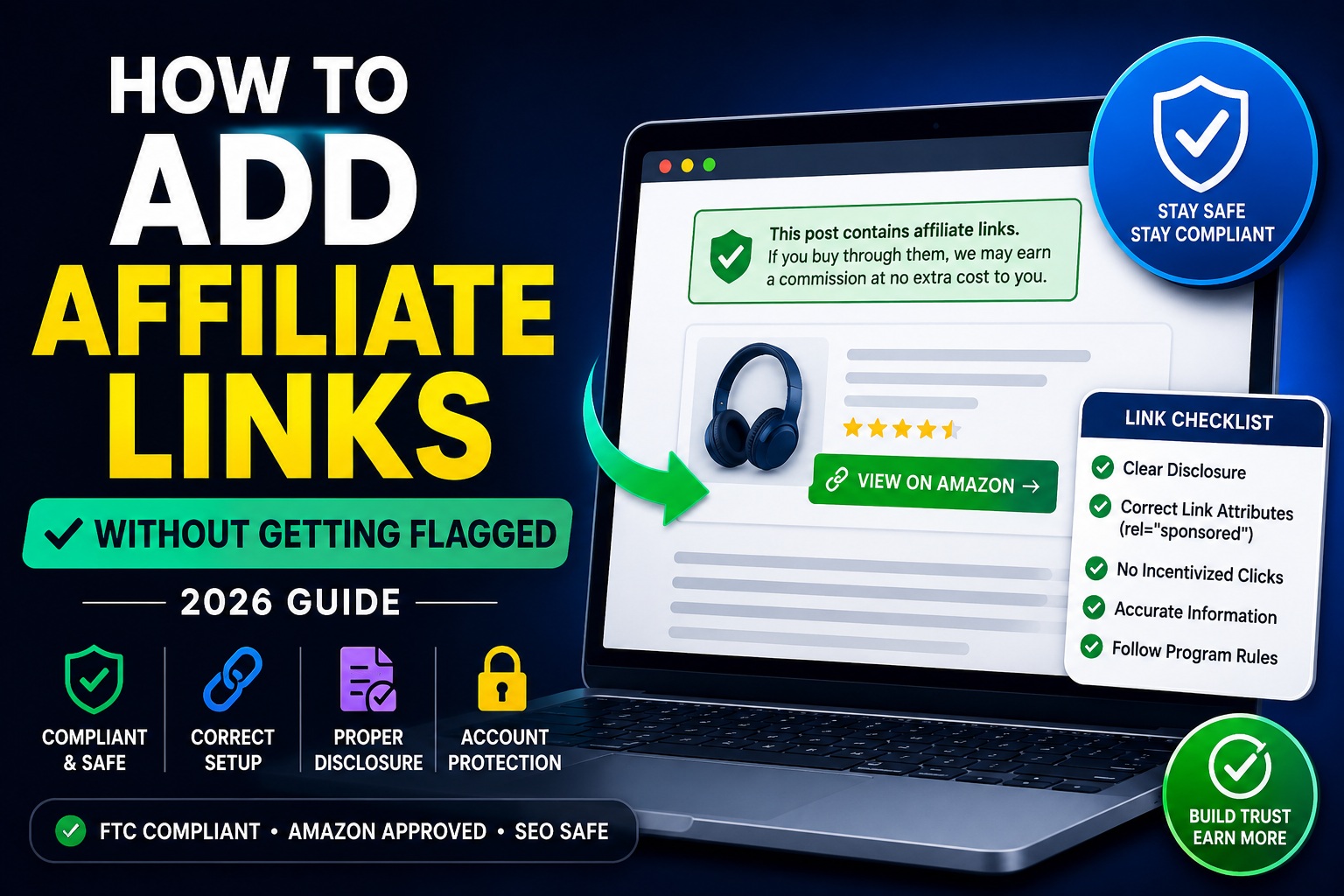
- Written in plain language ("This post contains affiliate links. If you buy through them, we may earn a small commission at no extra cost to you.")
- Visible without needing to click or hover — not hidden behind a tiny asterisk
Amazon Associates has its own specific disclosure requirement on top of general FTC rules: your site must state that you're a participant in the Amazon Services LLC Associates Program, and that you earn from qualifying purchases. Generic disclosures alone don't satisfy this — check your specific program's exact required wording, since it does vary by network.
Practical fix: create a reusable disclosure block (a Gutenberg reusable block or a shortcode) and insert it at the top of every monetized post. Never rely on readers finding a standalone disclosure page.
Use the Right Link Attributes
This one is about search engine compliance, not program compliance — but ignoring it can quietly hurt your rankings, which hurts your traffic, which hurts your commissions anyway.
Google has been explicit that affiliate links, sponsored content, and paid links should carry a rel="sponsored" attribute (or nofollow as an acceptable fallback) so search engines don't treat them as organic editorial endorsements passing ranking value.
How to implement it without touching code:
- Most SEO plugins, including Rank Math, offer a built-in "nofollow external links" or link attribute setting
- Many affiliate link management plugins (like Pretty Links or ThirstyAffiliates) let you cloak and tag links with the correct
relattributes automatically, plus redirect through a clean/go/or/recommends/URL structure - Avoid plugins or manual tricks that fully hide the destination URL from users (aggressive cloaking) — that crosses from "clean link management" into deceptive territory both Google and affiliate networks flag
Never Incentivize Clicks or Purchases
This is where well-meaning bloggers get into real trouble. Nearly every major affiliate program — Amazon Associates included — explicitly prohibits:
- Offering readers a reward, discount, or entry into a giveaway specifically for clicking your affiliate link
- Telling readers "click this link to support the site" in a way that frames the click itself as the transaction (rather than a genuine product recommendation)
- Using affiliate links inside price-comparison tools that don't reflect real-time accurate pricing
The line is simple: your affiliate link should exist because the product is genuinely relevant to the content, not because you've built a mechanism to manufacture clicks.
Keep Pricing and Availability Claims Accurate
If you're running comparison tables (which you should be — they convert well), don't hardcode prices, ratings, or "in stock" badges that go stale. Amazon specifically prohibits displaying prices pulled from their site unless you're using their approved API to keep that data live and accurate.
Safer alternatives:
- Use a plugin that pulls live pricing via the official API (like AAWP for Amazon)
- Or skip displaying exact prices altogether and link out with general positioning ("mid-range pick," "budget option") instead of a dollar figure that will be wrong in a month
Don't Put Affiliate Links Where They're Prohibited
This trips up a surprising number of bloggers who are otherwise doing everything right. Common program-specific restrictions include:
- No affiliate links in email newsletters (a rule several major programs, including Amazon, enforce strictly — link to your blog post instead, and place the affiliate link there)
- No affiliate links in downloadable PDFs, ebooks, or offline material for programs that restrict links to your approved website only
- No affiliate links on social media posts directly, depending on your program's terms — again, link to the blog post that contains the properly disclosed affiliate link instead
Practical fix: build the habit of always routing traffic through your website first, where your disclosure lives and your link attributes are correctly set — rather than dropping raw affiliate URLs anywhere convenient.
Keep One Sitewide Disclosure Page, Plus Per-Post Disclosures
Belt and suspenders here. In addition to your in-post disclosure blocks, maintain a dedicated /affiliate-disclosure/ page linked in your site footer. This isn't a replacement for per-post disclosure — it's a backup that shows good-faith compliance and gives readers a place to understand your monetization model in full.
Review Your Program's Terms Every Few Months
This sounds tedious, but affiliate program terms genuinely do change — sometimes with very little notice. What was acceptable link placement or wording a year ago can quietly become a violation. Set a recurring calendar reminder every quarter to skim your top program's operating agreement for updates, especially around disclosure wording and prohibited content categories.
A Simple Compliance Checklist
Before you hit publish on any monetized post, run through this:
- ✅ Disclosure block placed near the top, before the first affiliate link
- ✅ Affiliate links tagged with
rel="sponsored"ornofollow - ✅ No fake urgency, fake pricing, or hardcoded prices that will go stale
- ✅ No "click to support us" framing tied to a reward or incentive
- ✅ Affiliate links kept on your website — not in emails, PDFs, or restricted placements
- ✅ Sitewide disclosure page linked in your footer
Final Thoughts
None of this is complicated once it's a habit — the mistake most new affiliate bloggers make isn't malicious, it's just not knowing the rules exist until an account gets flagged. Build these six habits into your publishing workflow from your very first post, and you'll spend your time growing traffic and testing new offers instead of appealing a suspended account.
If your site is still running on a slow, bloated theme, fix that foundation first — check out our comparison of the best free WordPress themes for affiliate marketing before you scale your content further.
FAQs
Do I need a lawyer to write my affiliate disclosure?
No. The FTC provides free public guidance (see the FTC's Endorsement Guides at ftc.gov) on what a compliant disclosure looks like, and most affiliate networks publish exact required wording in their program terms — you can adapt those directly.
Can I use link cloaking plugins safely?
Yes, as long as the plugin redirects to the real destination and doesn't attempt to deceive users about where they're going or misrepresent the link as non-commercial. Tools like Pretty Links and ThirstyAffiliates are widely used specifically because they keep links clean and correctly tagged, not to hide them.
What happens if my account does get flagged despite following the rules?
Most programs, including Amazon Associates, allow you to appeal with an explanation and evidence of corrected compliance. Address the specific issue cited, document the fix, and respond promptly — reinstatement is common when the violation was unintentional and corrected quickly.